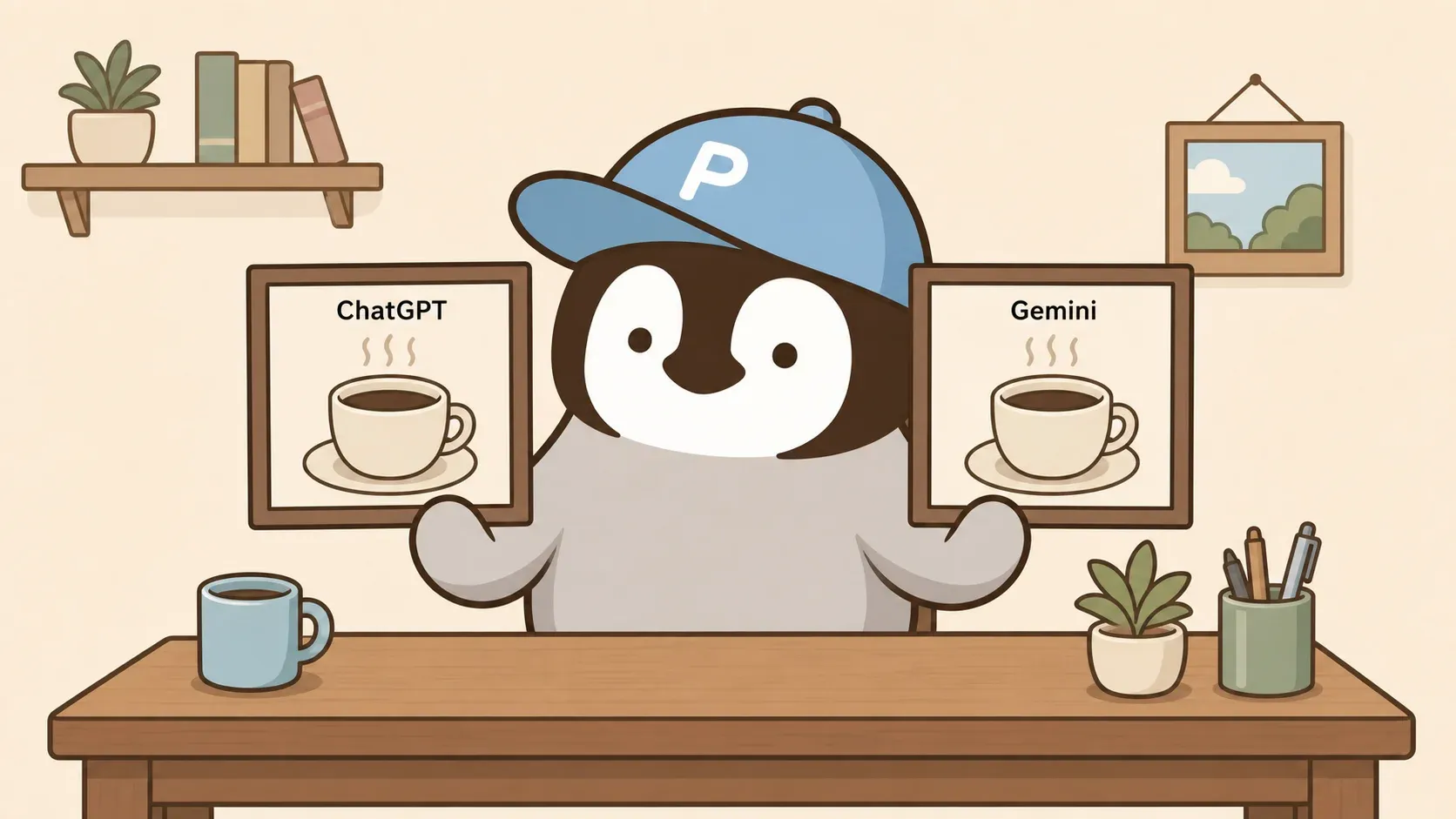
Both ChatGPT Images 2.0 and Gemini Nano Banana Pro can now produce AI images that get close to commercial-draft quality. Picking the right tool means looking past which image looks prettier — you need to weigh plans, Chinese-text handling, watermarks, commercial risk, and how well each one supports iteration.
Who Each Tool Is For: A Quick Reference
Matching by use case is faster than memorizing model names.
| Use case | First choice | Why |
|---|---|---|
| Everyday social graphics | Gemini | Generating multiple variations in one flow is smoother. |
| Article covers | ChatGPT | Title, spacing, and orientation can all be adjusted in the same conversation. |
| Product lifestyle shots | ChatGPT | More consistent realistic lighting and materials. |
| Presentation visuals | Gemini | Slides and Vids are steadily integrating Nano Banana Pro. |
| Character design | Gemini | Multi-image consistency is an official focus. |
| Chinese text embedded in images | Gemini | Text and infographics are officially highlighted. |
| UI wireframes | ChatGPT | Layout, interface structure, and text-image composition are stronger. |
| Realistic portrait risks | ChatGPT | More natural-looking people, though commercial use still requires watching out for likeness rights. |
Subscription Plans at a Glance
USD pricing is based on the official US page. What you actually pay in your region will vary based on local pricing, taxes, and exchange rates. Neither service publishes a fixed monthly credit quota — don’t treat community-reported account limits as official specs.
| Tier | ChatGPT | Image access | Gemini | Image access |
|---|---|---|---|---|
| Free | US$0 | Limited quota, slower generation; Images 2.0 available but no Thinking images. | US$0 | Image generation and editing available; Nano Banana Pro has a limited free quota and falls back to the original Nano Banana when exhausted. |
| Plus / AI Plus | ChatGPT Plus, US$20/month | More complex, more accurate generation; Images with Thinking available. | Google AI Plus, US$7.99/month | Higher access tier, includes Nano Banana Pro. |
| Pro / AI Pro | ChatGPT Pro, see official pricing page; version notes show Pro tiers at US$100 and US$200 | Faster generation, higher quota, though safety limits still apply. | Google AI Pro, US$19.99/month | Higher access, includes Nano Banana Pro. |
| Ultra | No personal tier by this name | Covered under Pro / Business / Enterprise plans. | Google AI Ultra, US$249.99/month | Highest limits; official docs state Ultra and AI Studio outputs have the visible watermark removed. |
ChatGPT Plus bundles image generation with data analysis, GPTs, voice, and writing tools in one place. Gemini AI Pro bundles image generation with Workspace, Gemini Notebook (formerly NotebookLM), Google Search, and cloud storage under one account.
The Underlying Models: ChatGPT Images 2.0 vs Gemini Nano Banana Pro
On the ChatGPT side, the model is ChatGPT Images 2.0, which maps to gpt-image-2 on the API. On the Google side, the model is Nano Banana Pro — current API model IDs are gemini-3-pro-image-preview and nano-banana-pro-preview.
| Capability | ChatGPT Images 2.0 | Gemini Nano Banana Pro |
|---|---|---|
| Access points | ChatGPT web, iOS, Android; Thinking images require Plus, Pro, or Business. | Gemini app via “Create images” and the Thinking model; higher quota on paid plans. |
| Resolution | API docs state gpt-image-2 supports long-edge up to 3840px; maximum consumer output is undisclosed. | API examples support 2K; maximum consumer output is undisclosed. |
| Aspect ratios | Selectable via menu or text instruction; API enforces a max 3:1 long-to-short-side ratio. | Set via aspectRatio, e.g. 1:1 or 16:9. |
| Editing | Upload an image and edit with text instructions, or use selection tools to target a region. | Image generation and editing supported; API pipelines also accept image inputs. |
| Multiple outputs | Thinking mode can generate multiple images from a single prompt. | App limits undisclosed; API supports workflow-level multi-image generation. |
| Text rendering | Official demos show multilingual script support; precise placement can still be inconsistent. | Text, infographics, and long strings are officially listed as focus areas. |
Quality in Practice
I won’t package a single test into a universal verdict. What official sources and independent tests can support:
- Realistic people and product photography: TechRadar’s April 28, 2026 side-by-side test found ChatGPT Images 2.0 closer to the reference scene on lighting, materials, and facial realism.
- Illustrations and stylized art: Both handle these; the real question is whether later edits preserve the character and layout.
- UI wireframes and presentation covers: ChatGPT feels more like a text-to-image workbench. Gemini’s advantage is the pipeline into Slides, Vids, and Workspace.
- Chinese text and signage: Both are better than early models, but Traditional Chinese long strings, Taiwan storefronts, and brand lettering still need character-by-character checking.
- Volume production: You need to check image 12 and image 20, not just the first one — brand consistency across a batch is the real test.
Same Prompt, Two Models
Three common use cases, same prompt, two outputs compared side by side. Real results vary based on random seed, model version, reference image quality, and API availability.
Pair 1: Chinese Signage and a Taipei Street Scene
Text-only prompt, no reference image.
Prompt:
A rainy night street scene in a Zhongshan District back alley in Taipei. Center frame: a coffee shop with a retro wooden sign reading「小企鵝咖啡」and a hand-drawn penguin illustration. The building is a small shop converted from a 1970–1980s Taiwanese apartment — red brick and washed stone exterior, warm yellow light glowing from the second-floor window. Outside the shop, 2–3 young people stand under transparent umbrellas chatting, dressed in a mix of vintage denim and contemporary streetwear. The wet pavement reflects neon lights and signage. The atmosphere is the kind of old-building café scene Taipei's young people love. Photography style, warm evening color temperature, light film grain. Traditional Chinese characters on the sign must be spelled correctly.| ChatGPT Images 2.0 | Gemini Nano Banana Pro |
|---|---|
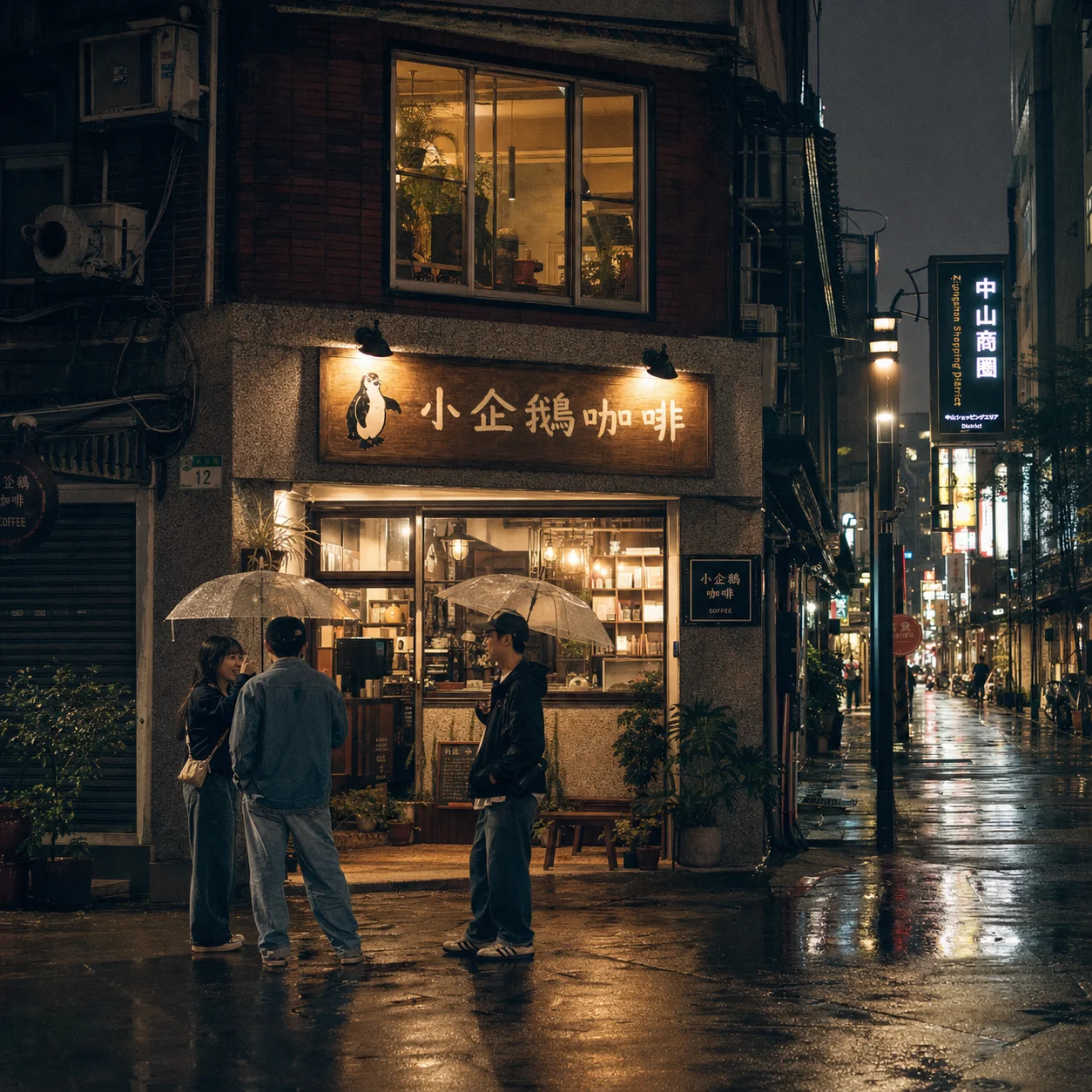 | 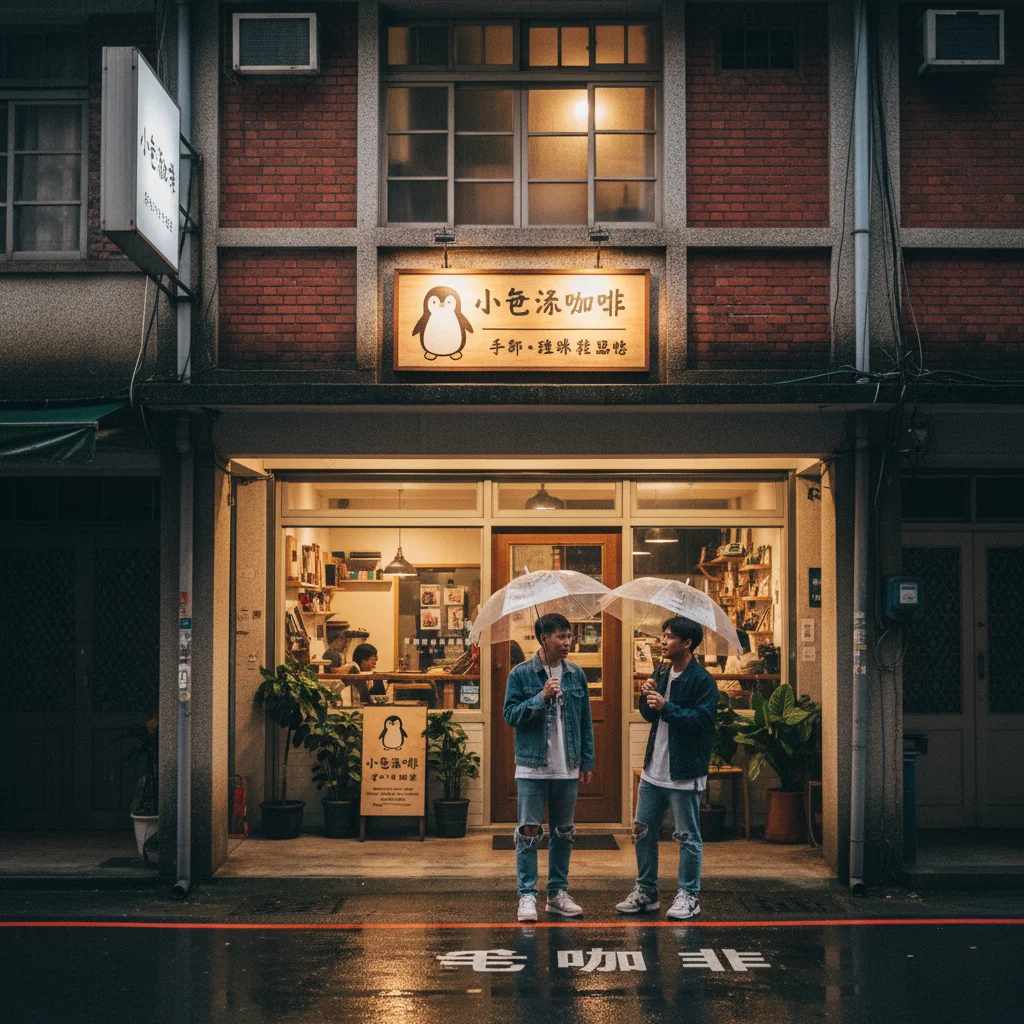 |
ChatGPT’s main sign read as「小企鵝咖啡」, and the old-building exterior, umbrellas, and reflective pavement matched a real Taipei alley. Gemini nailed the nightlife atmosphere and red-brick old building, but the main sign didn’t accurately spell out the shop name.
Pair 2: Recomposing a Product Shot from a Reference Photo
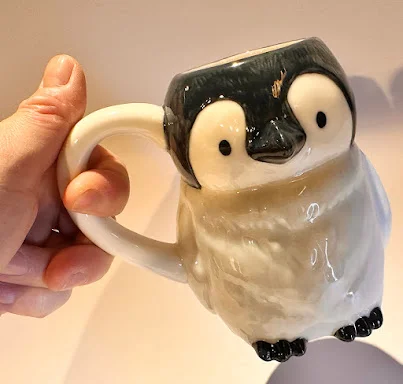
This time I gave both models a real product photo of a penguin mug and asked them to recompose it into an e-commerce main image.
Prompt:
Using this penguin-shaped ceramic mug as a reference, recompose it as a hero product image for an e-commerce website. Scene: placed on a light wood table next to a small flowering plant and a Japanese book. Soft studio lighting, 3/4-angle close-up, pale beige gradient background. Preserve the original mug's design details: rounded head, white belly, dark top, black wings, yellow beak, and overall cute silhouette. No brand logos or text.Reference photo:
| ChatGPT Images 2.0 | Gemini Nano Banana Pro |
|---|---|
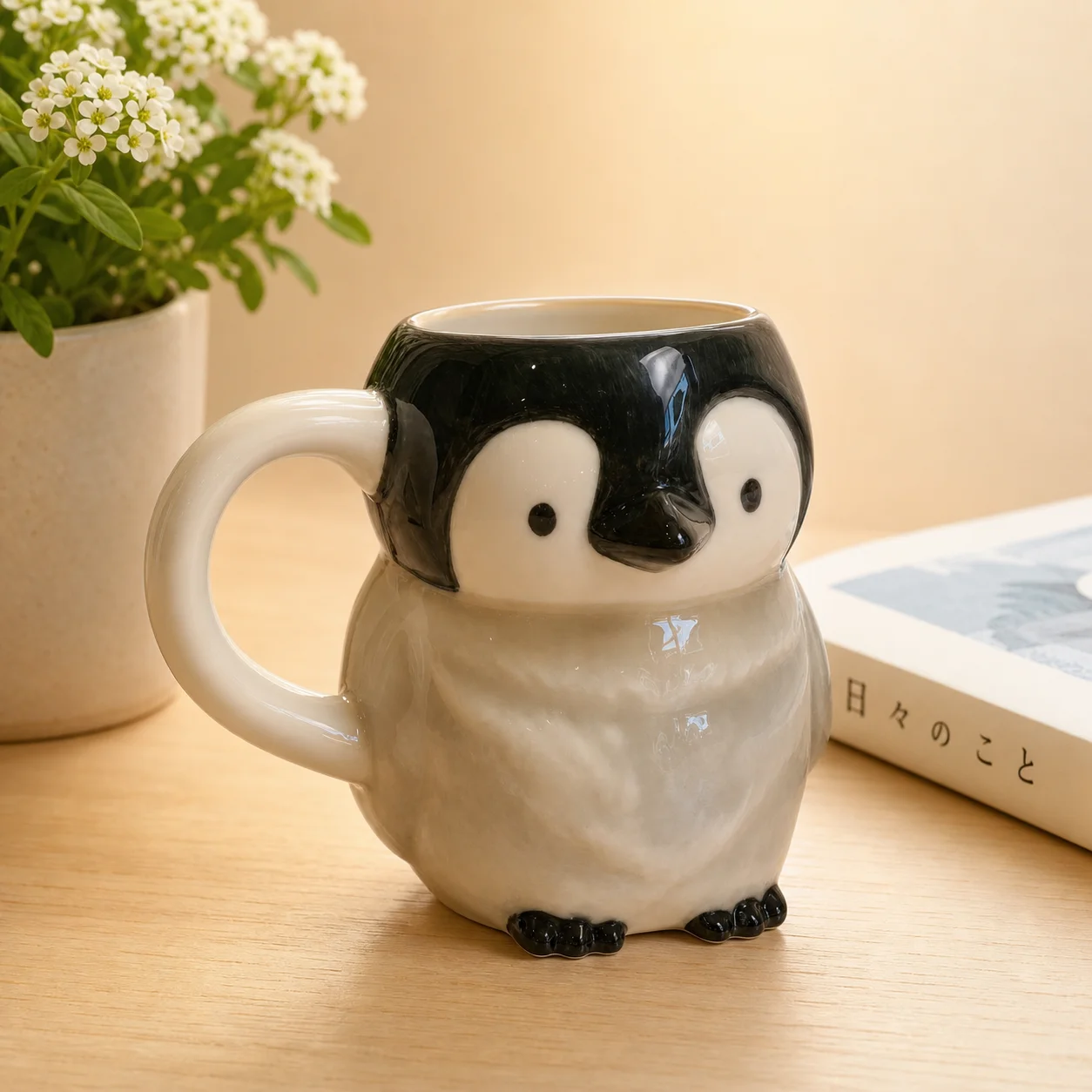 | 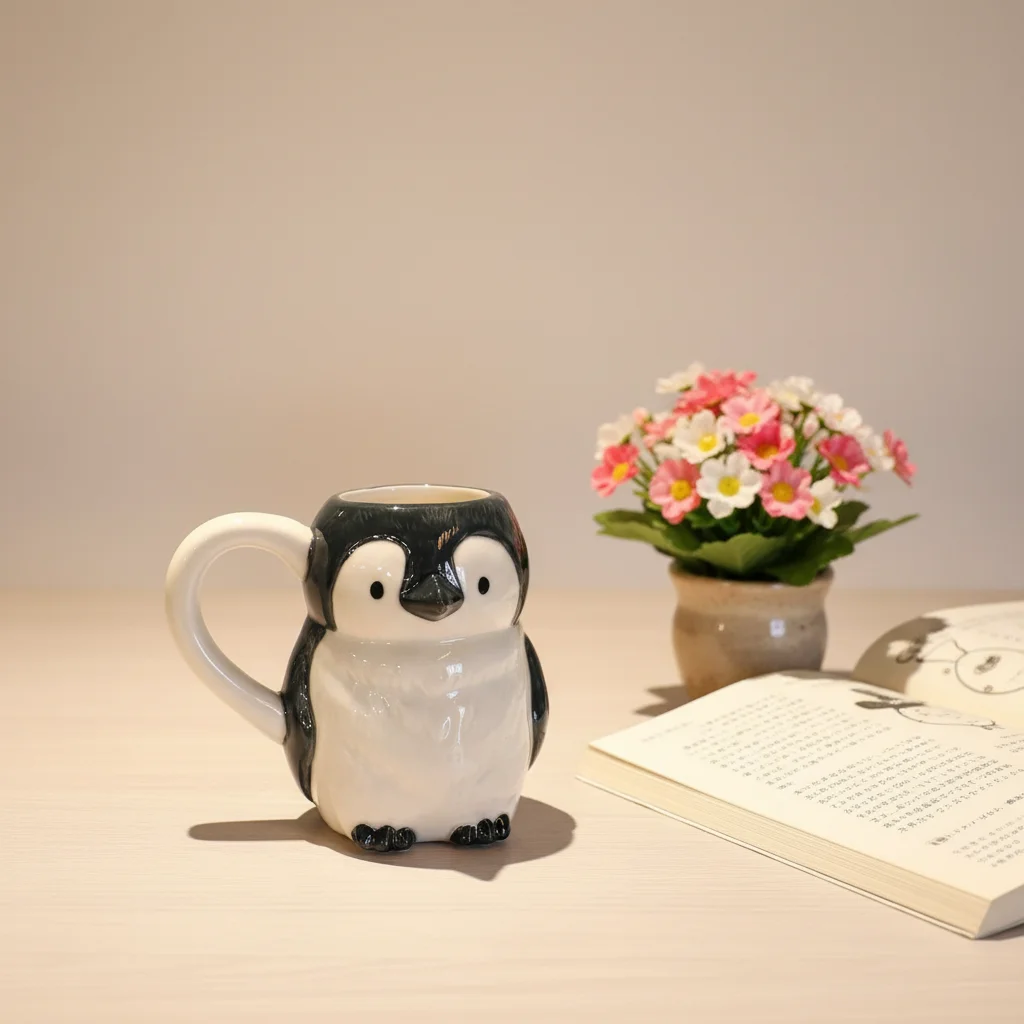 |
ChatGPT preserved the handmade glaze texture, the dark top, and the white belly proportions, with natural product lighting. Gemini produced a cleaner, more catalog-like result but compressed the body proportions compared to the original, losing some of the handmade ceramic feel.
Pair 3: Generating New Illustrations from a Brand Character
I gave both models Penchan’s penguin brand logo and asked them to produce a new illustration staying true to the character.
Prompt:
Using this penguin brand character as the main subject, generate a flat vector illustration of「the penguin sitting at a desk working on a laptop.」Keep the original brand character traits: blue P-letter cap, light gray-white body, dark top, cute rounded silhouette, cream background. The desk has a hot coffee, a notebook, and a small green plant. Light blue tones, soft lines, clean background. Style: flat illustration, editorial layout style, suitable for social media covers.Reference brand character:

| ChatGPT Images 2.0 | Gemini Nano Banana Pro |
|---|---|
 | 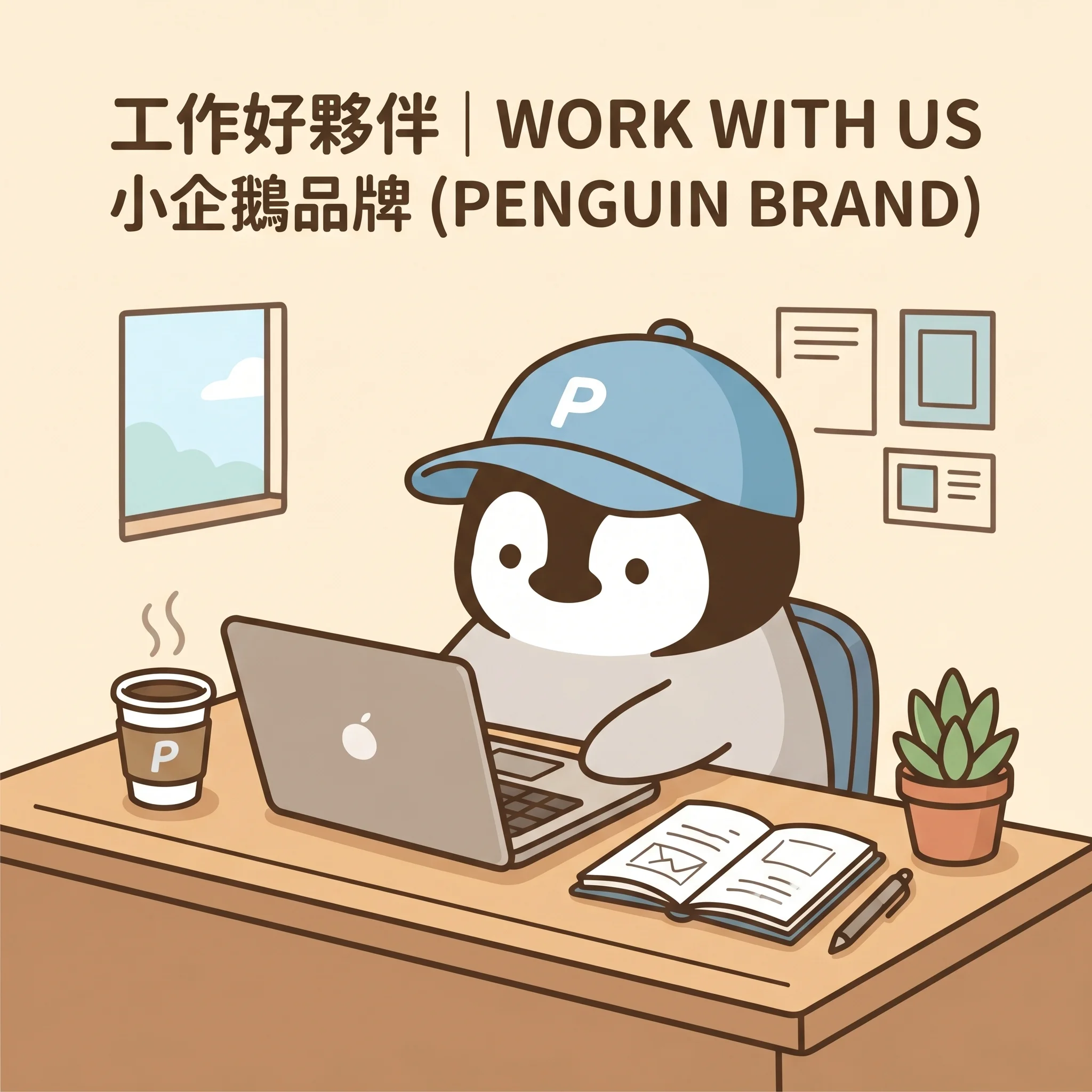 |
Both preserved the blue P-letter cap, cream background, and rounded silhouette. Both also defaulted to a classic black-and-white penguin body rather than the brand’s actual even-gray body — that’s a common trap when you only provide a single reference image. Where they diverged: Gemini added bilingual header text (“工作好夥伴 | WORK WITH US / 小企鵝品牌 (PENGUIN BRAND)”), expanded the brand name to “PENGUIN BRAND,” put a P logo on the mug, and even put an Apple logo on the laptop. ChatGPT added no text at all, and the laptop graphic was more neutral. When creating brand assets, Gemini’s tendency to add slogans and logos unprompted is worth blocking in your prompt upfront.
Chinese-Language Scenarios
For readers in Taiwan, the most relevant tests are Traditional Chinese signage, menus, event posters, Taiwan street scenes, Asian faces, and brand lettering. Official sources can only confirm that both have improved text handling — there is no published benchmark for Taiwan-specific scenes.
A more practical workflow:
- Don’t rely on image generation models to handle long Traditional Chinese strings in final output. Generate a blank-space version first, then add text in post.
- For Taiwan street scenes, be specific: arcades (騎樓), metal shutters, dense signage, scooters, bento shop light boxes. Don’t just write “Asian city.”
- For Asian faces, specify age, expression, camera angle, clothing, and lighting.
- Use brand lettering only to check composition. Don’t ask the model to reproduce an official logo.
Use Case Recommendations
- Article covers: ChatGPT. Headline direction, reader angle, whitespace, and iterations can all happen in a single conversation. Add Chinese text in post-production.
- Social media series: Gemini. The priority is series consistency, speed, and Workspace integration. Still check text, hands, logos, and faces before publishing.
- Product lifestyle shots: Start with ChatGPT. Packaging text, trademarks, and the final e-commerce hero image should be handled manually.
- Presentation visual drafts: Gemini for Google Workspace users. The pipeline into Slides and Vids is smoother.
- IP and character consistency: Start with Gemini, then lock it down manually with reference images, color swatches, forbidden elements, and review criteria.
Penchan’s Experience
My actual workflow uses ChatGPT more heavily — especially for article concepting, cover direction, and iterative editing. Gemini is primarily in my text workflow and Google ecosystem tasks, and I haven’t built out a full image-generation test set for it yet.
The most reliable approach is still to treat AI images as drafts. For article covers, I ask for a clean composition with whitespace first. Chinese text, logos, and brand elements go back into Canva or Figma.
My biggest fear with image generation is character drift. When the mouth, proportions, or eye expression shift even slightly, readers feel it doesn’t belong to the same set. That kind of asset requires reference images and human review.
If I eventually bring Gemini into the image production pipeline, I’ll test signage, convenience-store food scenes, social media series, article covers, presentation slides, and the penguin character first. I won’t write it up as experience until I’ve actually run those tests.