
On November 10, 2026, Anthropic added two new kinds of Artifacts in beta to Claude (Artifacts are the documents, tables, and other outputs Claude makes next to your chat): Claude Whiteboards and Claude Sheets. The earlier Claude Dashboards became generally available and was renamed Claude Data, and interactive connectors got an upgrade too. You used to have to move your output into another tool. Now it can stay in Claude, so your team can keep editing it together.
What Claude Whiteboards Can Do
Tell Claude about a messy plan and it organizes the plan into a whiteboard, for example a timeline with owners and dates. Team members can edit it at the same time.
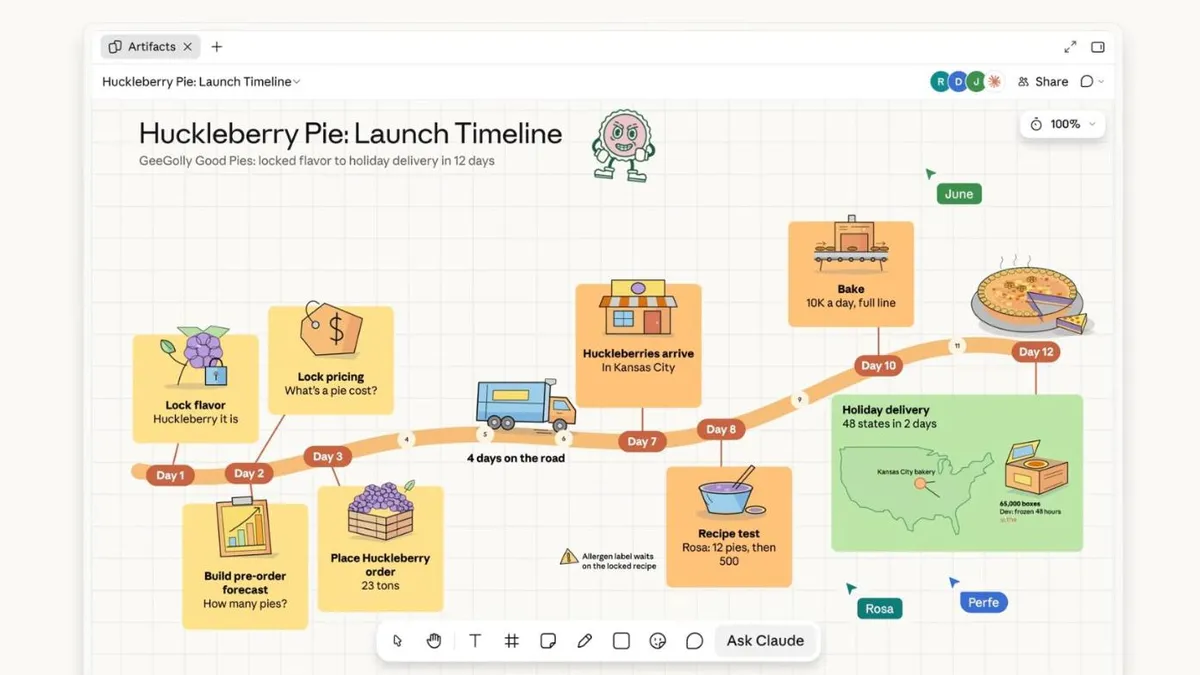
- For meetings: In a retrospective, everyone pastes in their notes, Claude groups them by theme, then writes action items for each person.
- Ask about one part: Select a section of the whiteboard and ask Claude about just that section.
- Take it with you: Turn it into a document or a presentation, or move it into online whiteboard tools such as Lucid, Miro, and Vani by Zoho.
What Claude Sheets Can Do
Usually one sentence is enough to have Claude build a spreadsheet with tabs, formulas, formatting, and dropdown menus, such as an event tracker or a hiring budget. Claude edits the cells directly and lists every new change, so you can track what changed and share the sheet with your team.
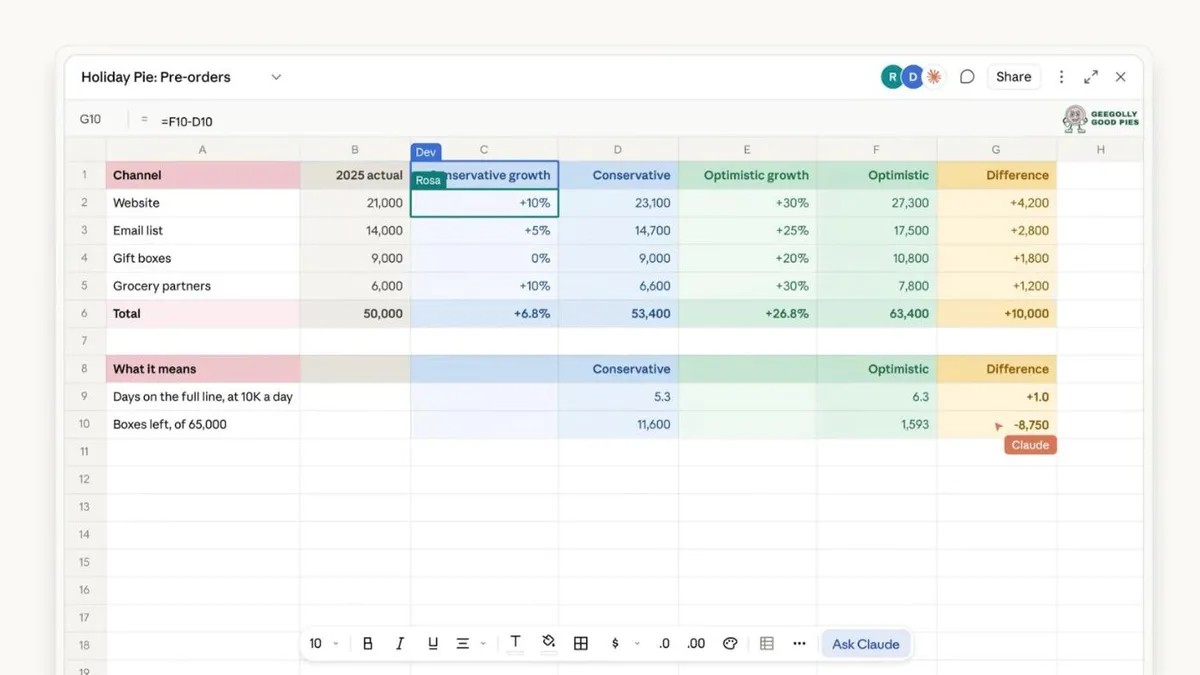
For now, Sheets only has basic spreadsheet features. When you need full features, export to .xlsx or CSV, use Claude for Excel, or keep working in Airtable, Asana, monday.com, or Smartsheet.
What Claude Data Can Do
Claude Data turns company data into dashboards, chart stories, or short videos with narration, and it can connect to tools such as Snowflake and Salesforce. Claude Dashboards launched in beta in October, and after the rename it is now generally available. Before you use it, you need to set up a connector for a data warehouse or a customer relationship management (CRM) system.
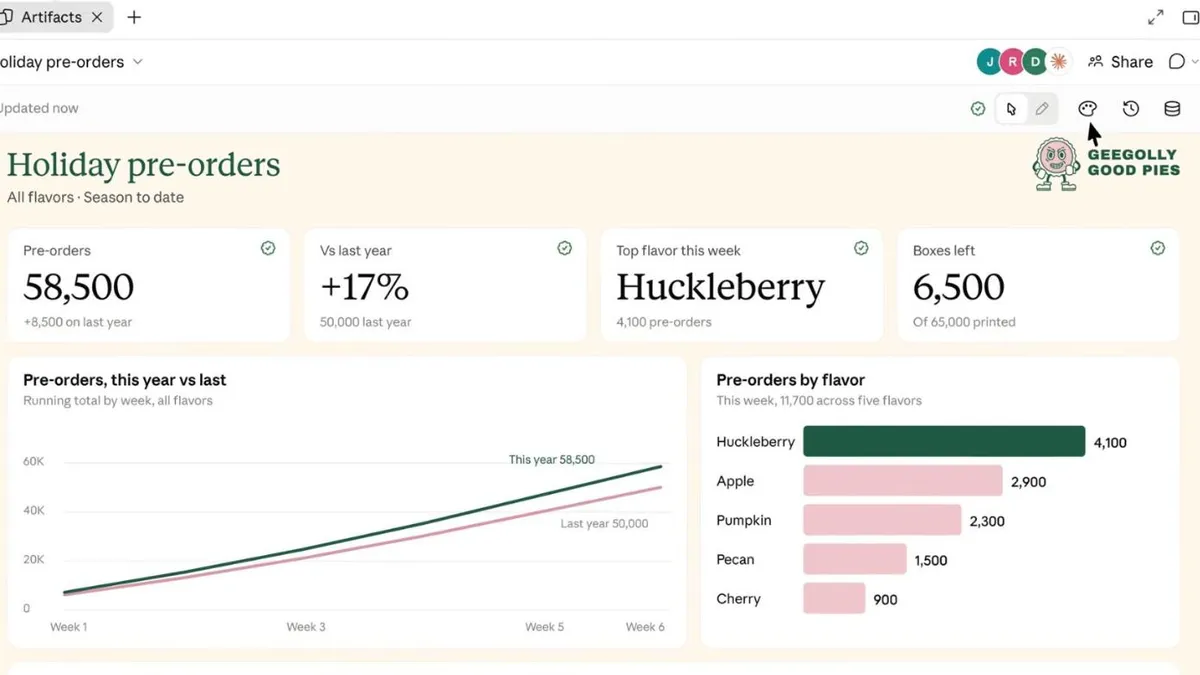
- Certification: Queries reviewed by a data team get a “Certified” badge on their charts.
- Sharing: Viewers can see the latest numbers without connector access, but only for approved queries.
- Stories and videos: You confirm the content before sharing.
- Version restore: Every change is recorded, and you can roll back.
Certified queries and live sharing are still in beta.
These three outputs can hand off to each other: ideas from a whiteboard carry over to a spreadsheet, then to a dashboard, with no need to explain them again. You can also ask Claude directly for a customer tracker, a daily briefing, a project status board, or a contract review table.
What Are Interactive Connectors?
Connectors are the channels that let Claude reach outside tools, and they are built on MCP, an open standard from Anthropic. An interactive connector opens a supported outside tool right next to your chat or in full screen, and when you ask Claude to change something, it changes it inside the tool.

- Not a preview: What opens is the full editor, signed in with your own account, such as Confluence or Notion.
- You approve: Claude’s actions need your approval, just like with regular connectors, and changes show up live.
- Easy to find: You can open them without typing a command, and pin them to the sidebar and the + menu.
The first batch of tools includes Asana, Canva, Carta, Dropbox, monday.com, Smartsheet, Vercel, and Webflow, and Adobe, Atlassian, Box, HubSpot, and Notion are also available already. Adobe can retouch photos and edit or redact PDFs, and Box can compare versions. Figma, Harvey, and Shopify are in development.
Who Can Use It and How to Turn It On
- Plans: Whiteboards, Sheets, and Data are available on all paid plans, on the web, desktop, and mobile.
- Interactive connectors: Available on all plans on the web and in the Claude desktop app, arriving with the new version of Claude. They show up once your account is updated or your organization turns them on.
- Team: All three are on by default.
- Enterprise: Whiteboards and Sheets are off by default, and admins turn them on in the organization settings (Organization settings > Artifacts). Claude Data is on by default from November 19.
Anthropic also announced that Claude Meetings is coming soon. It lets Claude join a call to take notes and, during the call, update the documents your team is editing.
How Are Enterprises Kept in Control?
- Admins decide who can use which products and connectors, and can limit each connector’s permissions, for example read-only access to Slack with no ability to post messages.
- Claude works within existing permissions, enterprise data is encrypted in transit and at rest, and audit logs are provided.
What It Can’t Do Yet
- Sheets only has basic features. When you need full features, export to .xlsx or CSV, or use Claude for Excel.
- Whiteboards and Sheets are still in beta, and Data’s certification and live sharing are in beta too.
- Claude Data can’t be used without a data connector, and Claude Meetings isn’t out yet.
Cover image source: Anthropic (claude.com/resources/articles/more-ways-to-work-with-claude-sheets-whiteboards-and-interactive-connectors)
This article provides consumer information about AI tool features; it is not securities or investment advice. Actual features and plans are determined by the latest official announcements, and the information in this article may become outdated.