
The short answer
Free Copilot is enough for chatting, looking things up and generating images. Copilot Pro, which many people search for, is discontinued. You only need to pay if you want Copilot directly inside Word, Excel and PowerPoint: individuals need Microsoft 365 Personal or higher (a paid Office subscription), and work accounts depend on the license IT provides.
Similar names, three different Copilots
| What you’re using | Who can use it | Where |
|---|---|---|
| Microsoft Copilot (free) | Users in supported regions | Web, mobile app, Windows, Edge |
| Copilot in personal Microsoft 365 | Owners of a personal subscription | All of the above, plus Office |
| Copilot in work Microsoft 365 | Work accounts with an eligible license | Copilot Chat for chatting. Word, Excel and PowerPoint depend on the license and organization settings. Email, files and meetings are integrated only after an add-on purchase |
GitHub Copilot, for writing code, is a separate product. See the GitHub Copilot tutorial.
What free Copilot can do, and where it stops
Free Copilot can chat with you, write, brainstorm and summarize, answer current questions with web search, and summarize web pages in Edge. You can use it without signing in. Signing in with a personal account adds chat history, image generation, longer conversations and voice.
Microsoft says Copilot is available in more than 170 markets worldwide and supports Traditional Chinese, but it is not available in China (Hong Kong excepted) or in embargoed markets.
There are two limits:
- Microsoft’s support page does not say how many questions you can ask per day on the free version.
- It cannot edit your files directly inside Word, Excel or PowerPoint. That is a paid subscription feature.
What happened to Copilot Pro
Microsoft’s support page says Copilot Pro is discontinued, with support ending on August 1, 2026. The suggested replacement is Microsoft 365 Premium, so the personal plans below are what you are actually comparing now.
Paid personal plans: the difference is features, usage and Copilot in Office
Prices as shown on Microsoft’s Taiwan site on November 14, 2026 (Taiwan prices; other countries differ):
| Plan | Monthly | Annual | What differs in Copilot |
|---|---|---|---|
| Microsoft 365 Personal | NT$309 | NT$3,090 | Copilot in Office, with higher usage than the free version |
| Microsoft 365 Family | NT$419 | NT$4,190 | Software can be shared by 6 people, but Copilot’s AI features are limited to the subscription owner |
| Microsoft 365 Premium | NT$669 | NT$6,690 | Higher usage, including advanced research and analysis features |
| Microsoft 365 Pro | NT$3,299 | Monthly only | “Highest” usage for chat, vision and voice, plus Copilot Cowork. AI-generated audio is English only |
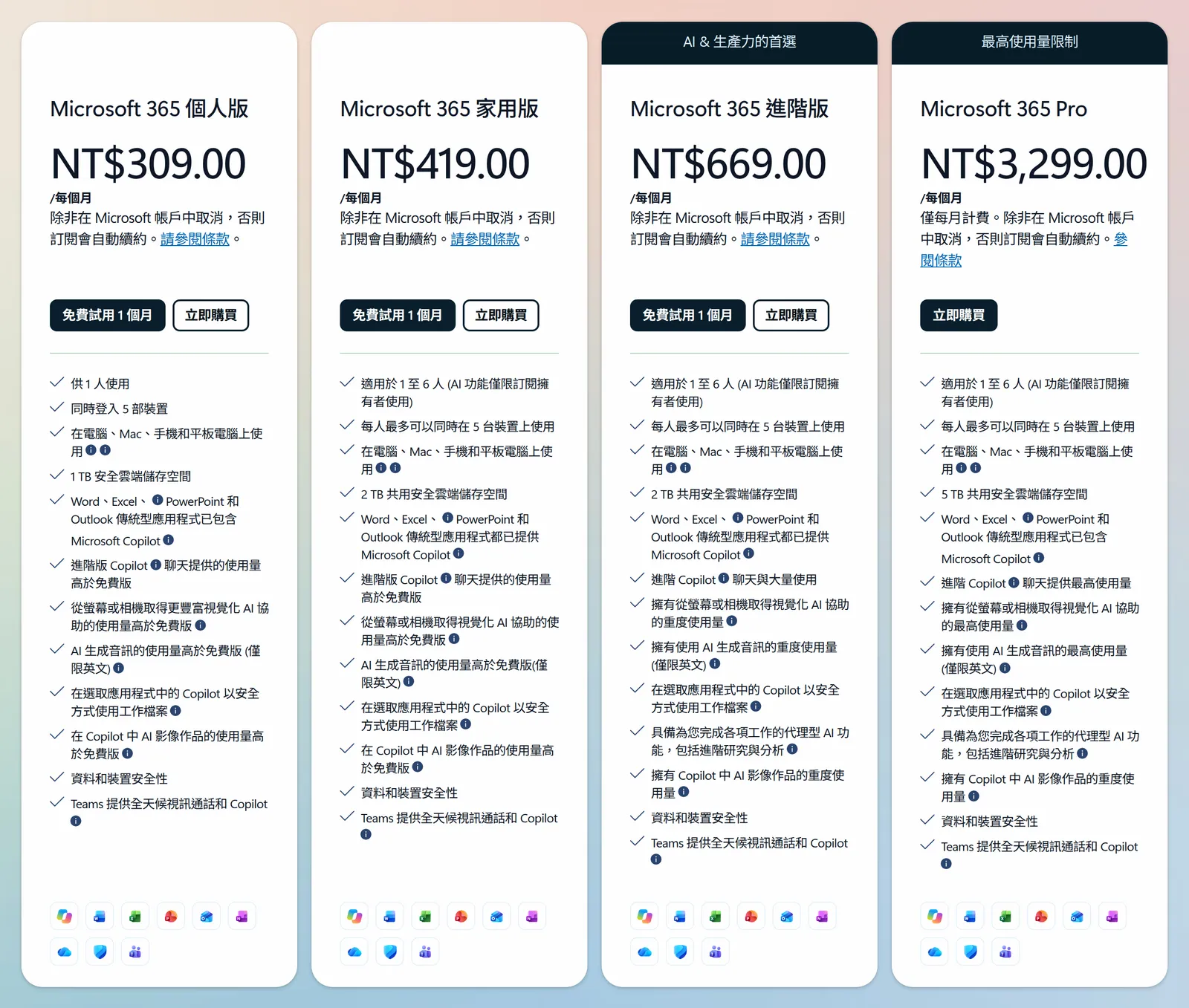
The usage table on the support page words it a little differently. Chat is listed as “heavy use” on all four plans, and the differences are in vision and voice (standard for Personal and Family, more for Premium, highest for Pro). Image generation is higher on Premium and Pro. Microsoft gives only levels, not exact counts.
The biggest difference after paying is that Copilot can work on documents directly in Office, for example drafting a letter in Word or analyzing a budget sheet in Excel. This is a perk for the subscription owner. Other family members can only use Copilot Chat.
Excel has a prerequisite: Copilot needs AutoSave turned on, and the file must be saved in OneDrive. Files that have not been saved cannot be used.
Personal, Family and Premium all come with a 1-month free trial. When the trial ends, the subscription renews automatically and you are charged. If you don’t want to pay, cancel before it ends.
For work: Copilot Chat and Microsoft 365 Copilot
People with an eligible Microsoft 365 business license get Copilot Chat at no extra charge and can chat by signing in with their work account. Without a Copilot license, some features are limited, such as file upload, image generation and models. Whether Word, Excel and PowerPoint work depends on the license type and organization settings.
To have Copilot work with your organization’s email, files and meetings, the organization must pay extra. The prices below are from Microsoft’s Taiwan site on November 14, 2026, all per person per month, excluding sales tax (Taiwan prices; other countries differ):
| Plan | Billed annually | Billed monthly |
|---|---|---|
| Microsoft 365 Copilot (enterprise) | NT$965 | NT$1,013 (annual commitment, billed monthly) |
| Copilot Business add-on | NT$675, first-year promotional price NT$578.58 | NT$810 |
| Business Standard + Copilot Business | NT$755 | NT$906 |
| Business Premium + Copilot Business | NT$1,030 | NT$1,236 |
The Copilot Business add-on promotional price applies only to purchases made from July 1 to December 31, 2026, requires annual billing and covers the first year. The organization decides on this spending, so ask IT first.
Student discounts are collected in AI student plans: the complete guide.
Which plan do you need for Copilot presentations
Free Copilot can help you plan an outline, write the text for each slide and generate images, but you have to paste them into PowerPoint yourself. To have Copilot generate slides directly inside PowerPoint, an individual needs at least Microsoft 365 Personal, and a work account depends on the organization’s license and settings.
To choose between presentation tools, see AI presentation tools compared and the AI presentation tools guide.
Penchan’s Take
- Just asking questions, looking things up and generating an occasional image: the free version is enough. Remember to sign in.
- Working in Word, Excel and PowerPoint every day: start with Microsoft 365 Personal, and move up to Premium only if you use it heavily.
- Pro’s monthly price is almost 5 times Premium’s, and it buys the highest usage for vision and voice plus Copilot Cowork. If Premium is enough, stay on Premium.
With a work account, ask IT whether Copilot Chat is enough before you consider buying a license.
Further reading
- AI subscription picks: ChatGPT, Claude, Gemini and Grok pricing and plans compared
- AI presentation tools compared
- AI student plans: the complete guide
- GitHub Copilot tutorial
This article is a consumer comparison of AI tool features and subscription plans. It is not securities or investment advice. Actual pricing is subject to Microsoft’s latest official announcements. The information here is current as of November 14, 2026, and may be out of date.