
On November 13, 2026, Anthropic published “Building always-on agents” (author William Hu), which explains how it builds an AI assistant that is on call around the clock. The design has five building blocks: an event inbox, timers, memory, permissions, and an outbox.
An always-on agent is an AI that wakes itself up to get things done. For a longer explanation, see What Is an Always-On Agent?
An always-on agent is mostly asleep
Anthropic says “always on” is only how it feels to the user. The agent sleeps most of the time and spends no tokens (the unit AI usage is billed in). It wakes up to run once when an event arrives: it takes in the event, opens a session (the transcript of messages and tool calls), runs the agent loop, and writes the result back to stored state. Then it goes back to sleep, and the cycle repeats.
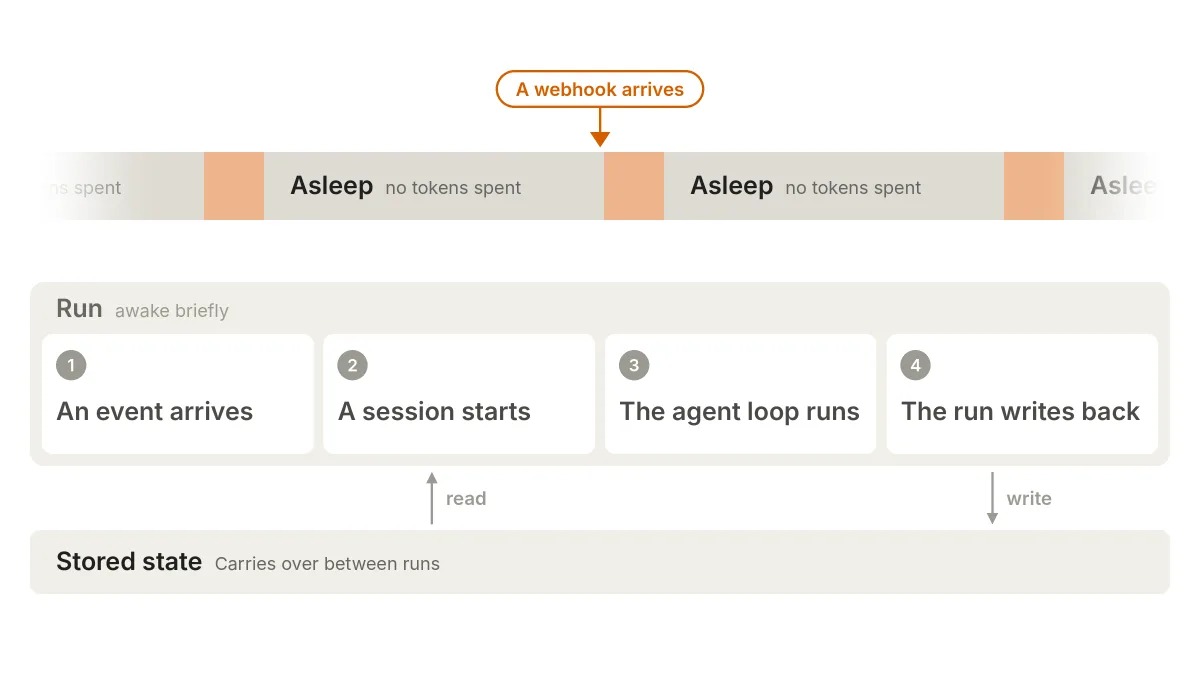
The core loop is the same as in any other agent. What differs is the architecture around it: when it wakes, what is left behind between runs, and how results reach you.
Why this is feasible now
Anthropic gives two reasons. Newer models have better judgment: they understand what the user means and know when to check in. Intelligence is also getting cheaper, and long tasks benefit most. In one long-running coding benchmark, Opus 5.5 cost 78% less per solved task than Opus 5, against 40% less on typical workloads. When long tasks get much cheaper, running an always-on agent becomes more practical. For details on Opus 5.5, see Claude Opus 5.5 overview.
Event inbox: every event queues first
A regular AI moves only when you send a message. Here there are more triggers: webhooks (notifications sent by another system), scheduled tasks, and background jobs.
Letting every source call the agent directly causes problems. If two events arrive together, they start competing runs, and an event can vanish without a trace in a crash.
So every source only drops its event into the inbox, and a worker (a background service) picks events up from there. The simplest version has three things:
- A table that records events
- A handler that writes events
- A worker that reads events
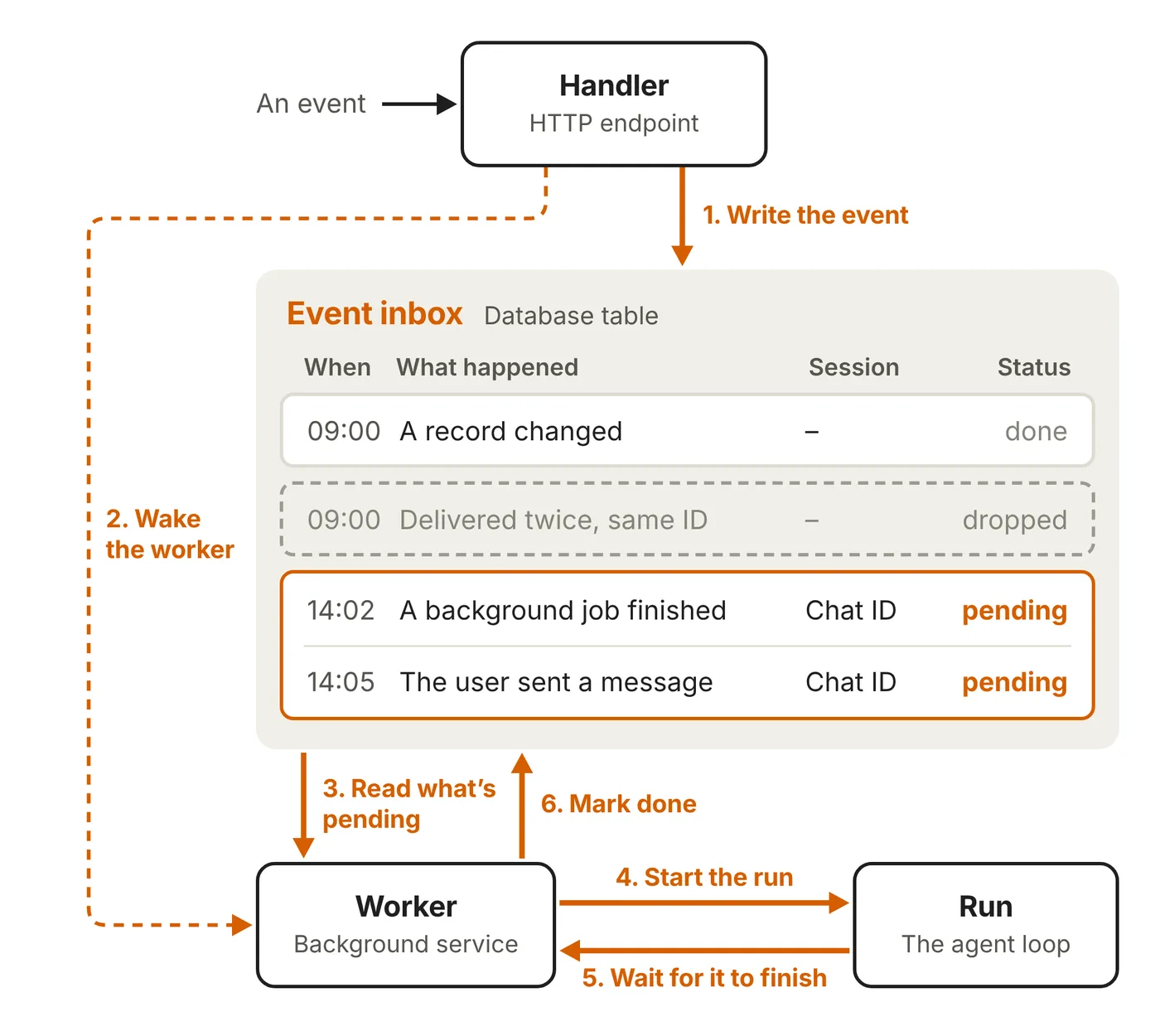
The handler should respond fast, and deeper checks such as prompt injection (malicious instructions hidden in content to trick an AI into following them) are left for inside the run. The inbox is the source of truth, so if a worker dies, a new one can pick up the same event and redo it. Only one worker is active per inbox at a time, and several messages that arrive in a row can be batched into one run, so the agent replies only once.
Timers: the agent schedules its own next wake-up
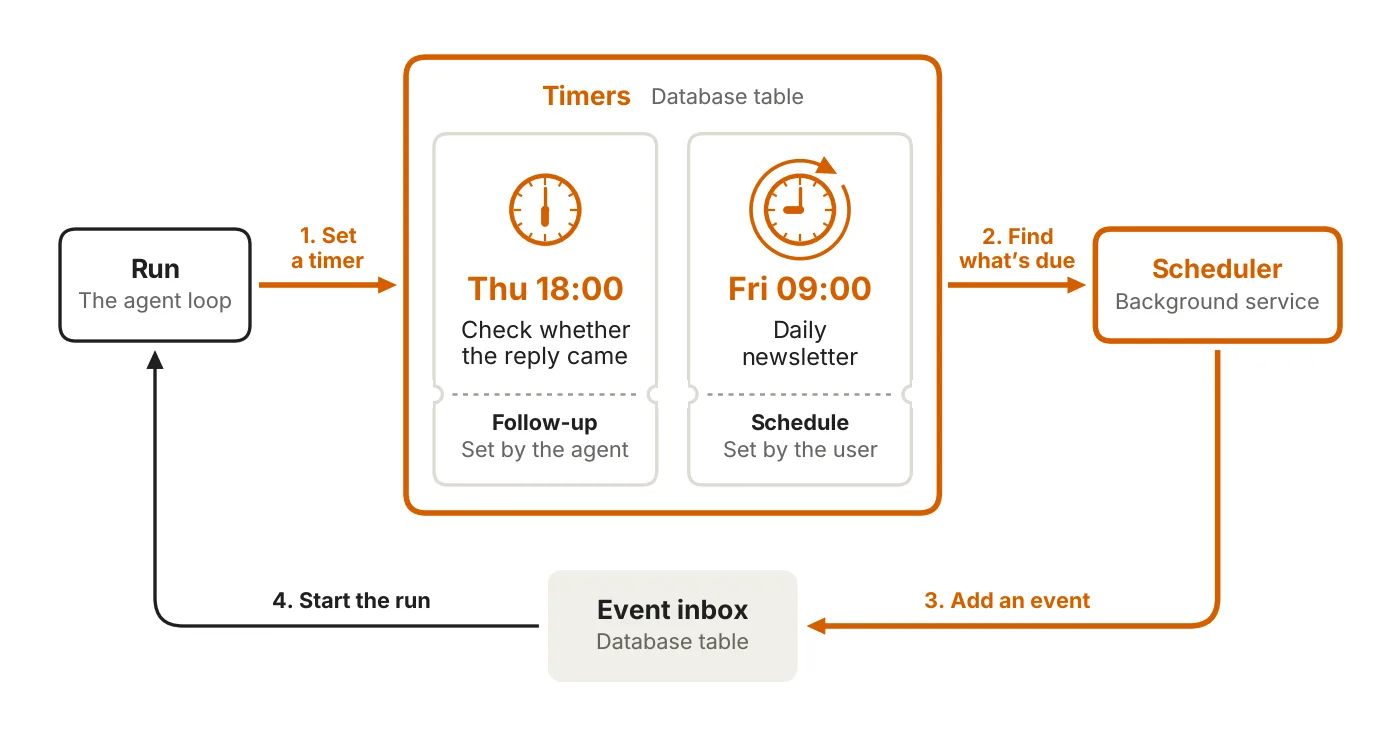
To act on its own, an agent also needs timers. There are two kinds:
- Follow-up: a deadline the agent sets for itself, such as checking back to see whether someone replied
- Schedule: a recurring task on a fixed cadence, such as a daily newsletter
Timers live in their own table, and the inbox holds only events that are ready to process. A timer does not start a run by itself. A scheduler polls on a regular basis, turns anything that is due into an event, and drops it into the inbox.
Memory: how every wake-up picks up where it left off
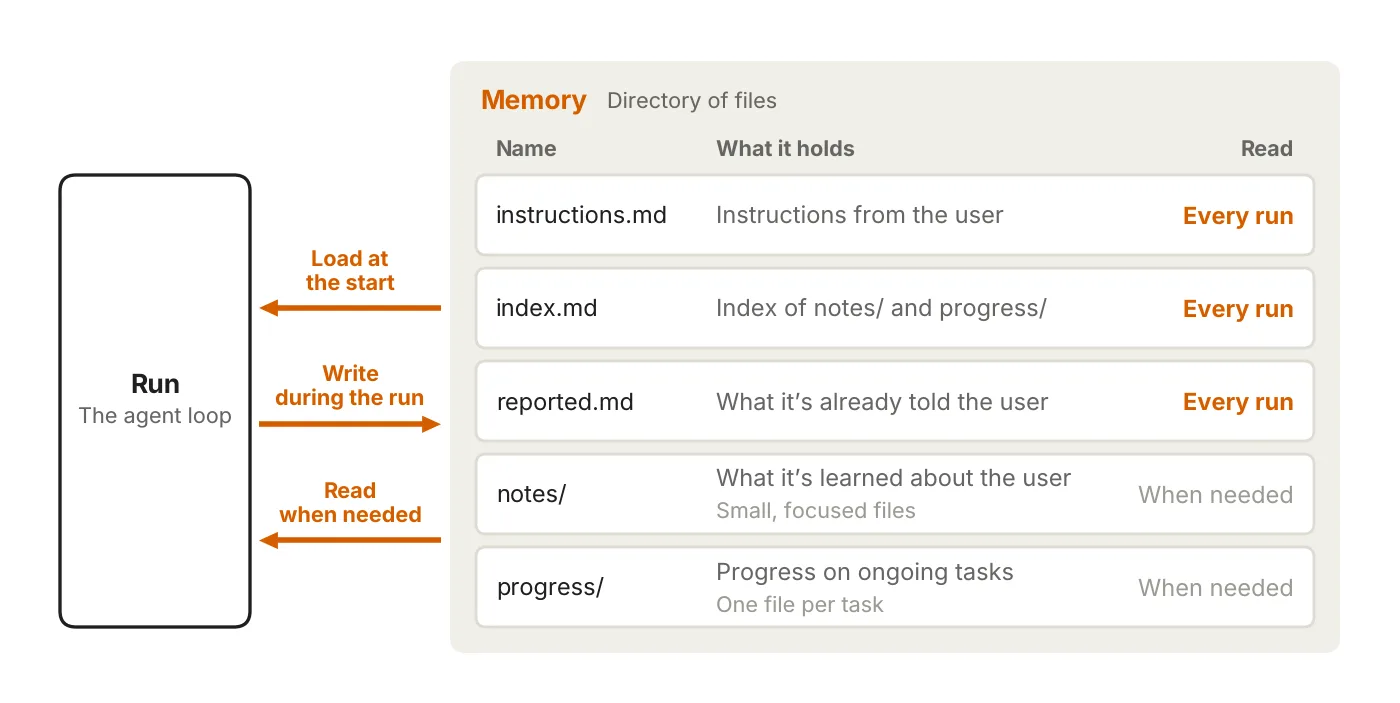
Runs are disconnected from one another, so memory provides the sense of continuity. Claude Code’s auto memory and the Messages API’s memory tool both implement memory as a directory of files. An always-on agent should keep these directories in a durable place such as a database or object storage, so the memory survives even when the worker changes.
The principle is to store only what the agent cannot look up again. If the data already lives in another system (an issue tracker, for example), store just a pointer. There are four kinds of memory:
- User instructions: a single file loaded on every run, because the user will not always be around to give directions
- User notes: role, preferences, and places where the user has corrected the agent. Only the index is loaded, and details are read when needed
- Past messages: what the agent has already told the user, to avoid repeating itself
- Task progress: one progress file per task, so a new run can read it and carry on
You can also add dreaming: reviewing past sessions to curate memory, replace outdated entries, and find patterns that only show up across many runs. Claude Managed Agents already has a similar feature, covered in What Claude Managed Agents Dreams Is. For the basics of memory, see How AI Agent Memory Works.
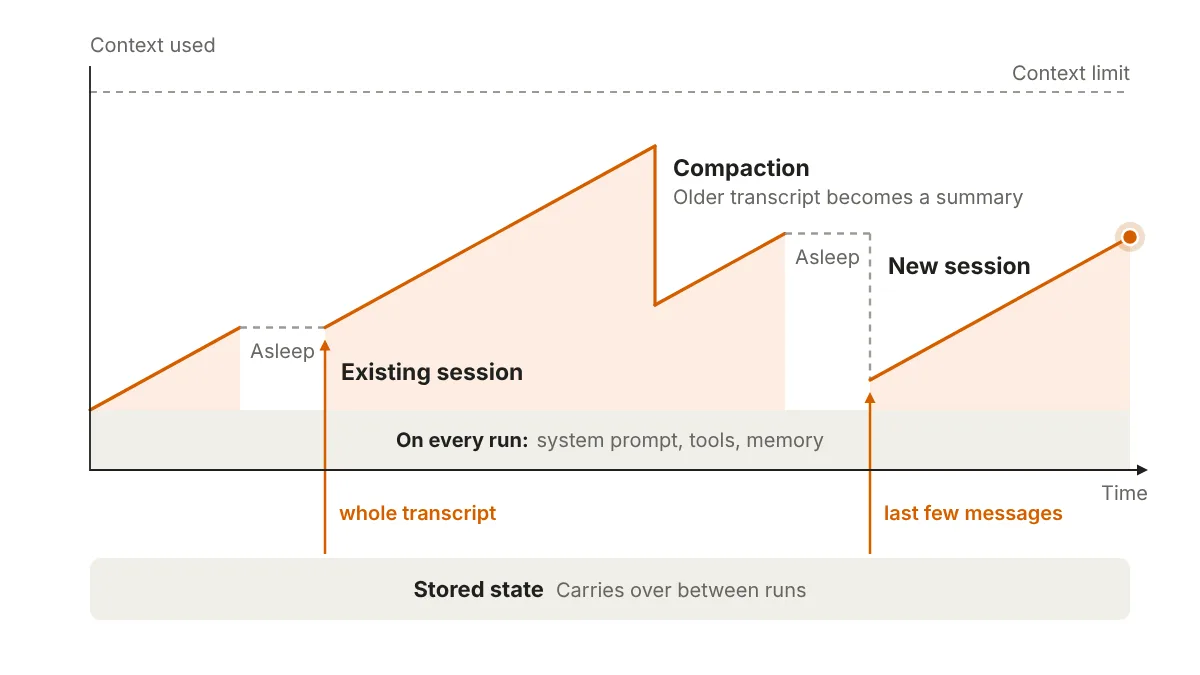
At the start of each run, the agent loads the system prompt, tool definitions, and memory files. That is a cost paid on every run, so keep it lean and use prompt caching (caching a repeated opening to save cost). A new session carries only this overhead and the triggering event, while an existing session brings back all its earlier messages.
When a session grows too long, you can compact it (squeeze older messages into a summary) or start a new session. Both lose detail, so save anything important to memory first.
Permissions: where the risk concentrates
Anthropic points out that permissions carry the most risk: a run holds the user’s access, and nobody is watching. For each tool call, the agent has to decide whether to proceed, block, or wait for approval. There are three approaches:
- Keep credentials outside the agent: credentials such as passwords and access tokens go to a proxy outside the agent’s environment, which adds them when a request is sent, so the agent never holds them
- Auto mode: as in Claude Code, classifiers review higher-risk actions and block dangerous ones, and Claude takes a safer route instead. The most important decisions still need the user’s review
- Deferred tool call: when approval is needed, the run ends and the session is saved in a half-finished call state. The request is shown to the user as an interactive card (Anthropic’s example is an interface built with MCP Apps), the reply comes back as an event in the inbox, and a new run picks up from there. While waiting, the worker can handle other events
For more risk areas, see AI Agent security risks.
Outbox: report the result, not the process
A regular AI streams its whole thought process in real time. An always-on agent works in the background, and you get only the result and the key points.
A run ends in one of three ways: send a message, decide there is nothing worth saying, or ask you through a deferred tool call. For most agents, a “send” tool that delivers directly is enough. A formal outbox is only needed to control the pace of messages or recover from errors: a table of messages waiting to go out, plus a dispatcher that decides which ones get sent.
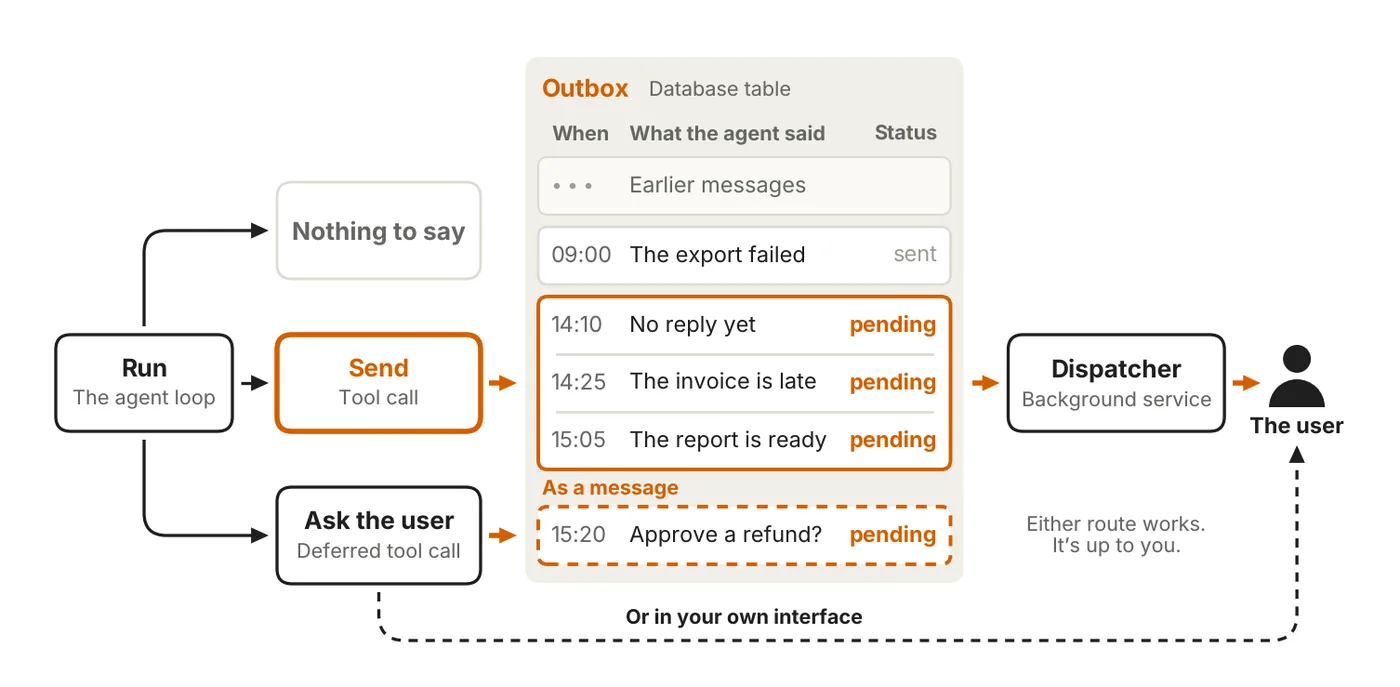
Message volume needs tuning: too many and it gets noisy, too few and things get missed. Anthropic recommends using evals (tests) to find the balance, starting quiet and slowly earning more of the user’s attention.
How the five building blocks fit together
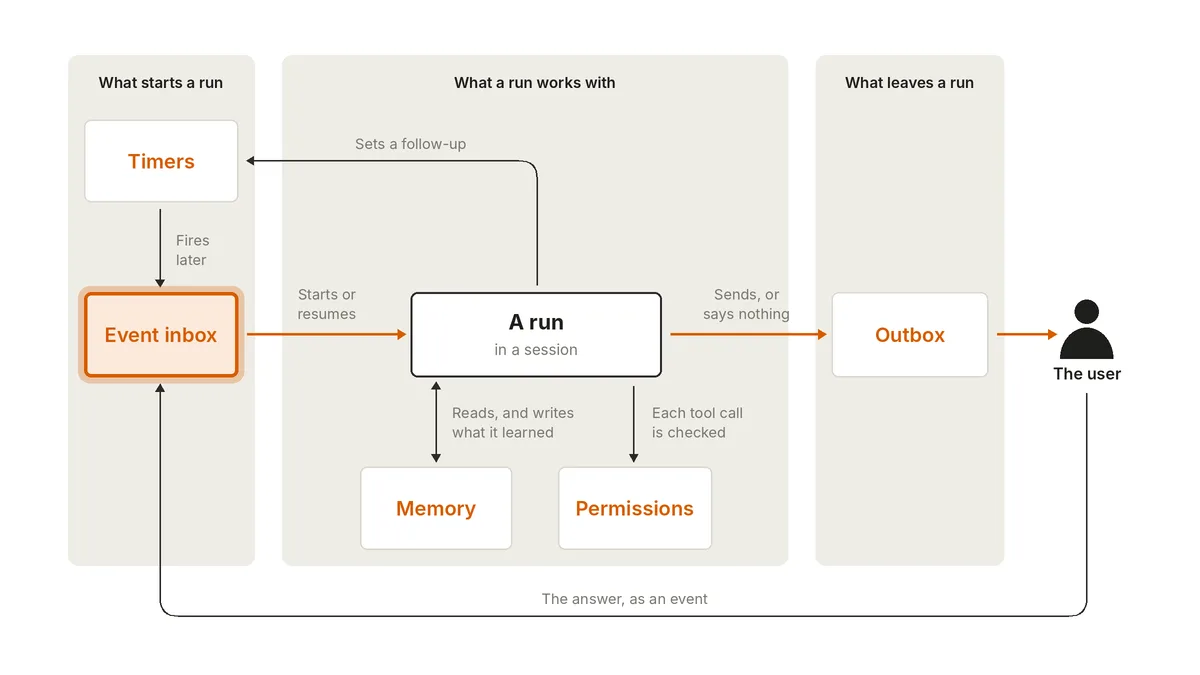
Every run starts with an event from the inbox, which could be a user message, a webhook, or a timer. The worker wakes the agent, in a new or an existing session. The agent reads memory first, acts within its permissions, writes what it learned back to memory, and finally pushes an item to the outbox, where the dispatcher delivers it to you.
A run can also set a timer to wake itself up later. Your reply becomes another event back in the inbox. Each run is short, and the cycle never stops, so the agent seems to be always online.
How this differs from Rubric Labs’ approach
Engineering team Rubric Labs’ design is one long conversation thread that never ends, with a heartbeat (a message pushed into the conversation on a schedule) waking the agent. Sending a message is also a tool, so the agent can decide not to bother you this time. It also has broad access and a notification inbox.
Both sides use a tool to decide whether to notify you, and both use an inbox to take in outside events. The difference is that Rubric Labs has a single thread, while Anthropic has the agent do one short run each time it wakes, in a new or an earlier session, with long-term information saved in memory files. For the basics of scheduling and sub-agents, see Skills, Sub-agents, and Cron: Three Automation Mechanisms.
Three questions for judging an always-on product
- How do events get in? Is there an inbox, or does every source call the agent directly?
- What does it remember? Are instructions, notes, things already said, and task progress stored separately?
- What can it do? Are your account credentials in its hands, and who approves high-risk actions?
On messaging, Anthropic recommends that an agent start quiet, tune message volume with evals, and slowly earn more of your attention.
Cover and inline images: Anthropic (claude.com/resources/articles/building-always-on-agents)
This article summarizes AI agent design concepts and is not securities or investment advice.