At a glance
OpenAI introduced ChatGPT dots on September 29, 2026 (DevDay), describing them as powerful, always-on AI agents powered by GPT-6 Astra. An AI agent is an AI that carries out tasks for you, rather than only answering questions. Dots are currently available to Pro and Business Premium users; Free, Go, and Plus users cannot use them yet.
What dots can do
Everyone gets their own dot, a personal AI assistant. Here are the main features:
- Its own cloud computer: OpenAI says each dot has its own cloud computer, learns from your feedback, and can work toward your goals continuously, 24 hours a day. It keeps working in the cloud even when your computer is off.
- Connects to more than 4,000 apps: Through ChatGPT plugins, it can connect to tools you already use. Gmail and Google Slides appear in OpenAI’s demo. You choose which apps to connect.
- Available across different places: You can message it in ChatGPT (desktop, web, or mobile), Slack, and Teams, or call it (at launch, it cannot call you first). It carries the same context across channels. Text messaging is currently a small test for Pro users in the United States only.
- Can optionally use your computer: This is off by default. You can connect a personal computer and revoke access at any time. The computer and the ChatGPT app must both be open for this feature to work.
- Does research without being asked: When you are not using it, the dot can use read-only tools to check sources you have connected and allowed it to access, then save its findings as private notes. OpenAI says these research tools cannot message other people directly, change content in connected apps, or operate a browser or computer.
OpenAI shared one example: a dot belonging to an early tester noticed that he had forgotten to invoice a publication, prepared the invoice, and sent it only after he approved it.
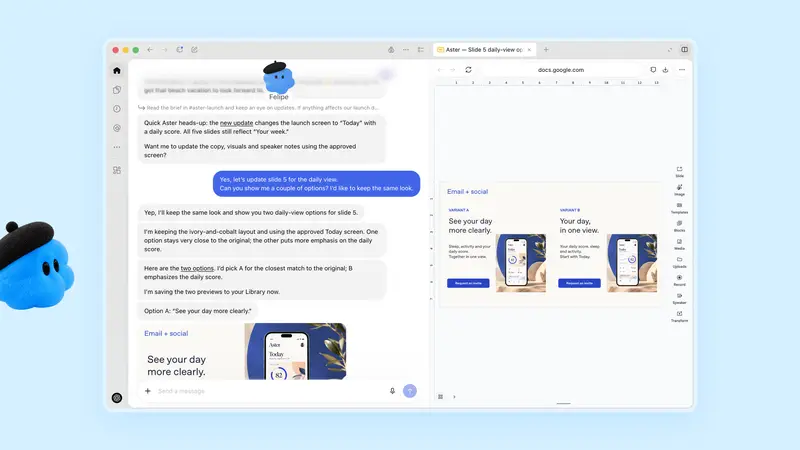
You must create your first dot in the ChatGPT desktop app or a desktop browser. After setup, you can message it from your phone, but you cannot create one there. I also could not find a developer API for dots.
Staying in control: rules, review, and privacy
OpenAI provides several ways to stay in control:
- Custom Rules: You can allow some actions automatically, require your approval for others, or block them outright.
- Activity View: See what the dot has done, including background work.
- Auto-review: Before actions that affect your account or share information, the system checks them against your instructions, rules, and built-in safety requirements. You cannot turn off this review.
- Sensitive steps handed back to you: Changing a password or transferring money between financial accounts always requires your involvement; the dot can help with surrounding tasks. OpenAI’s safety explanation says permanent data deletion, installing software from an unknown source, and granting new highly sensitive permissions require your approval every time. The Help Center only says approval may be required, so do not treat this as guaranteed. Purchases using a credit card saved on a merchant’s website also require your approval.
- Login passwords: On supported websites, a dot can sign in with a saved password. OpenAI says it does not give the password to the model; passwords you type into a conversation or document are not covered by this protection.
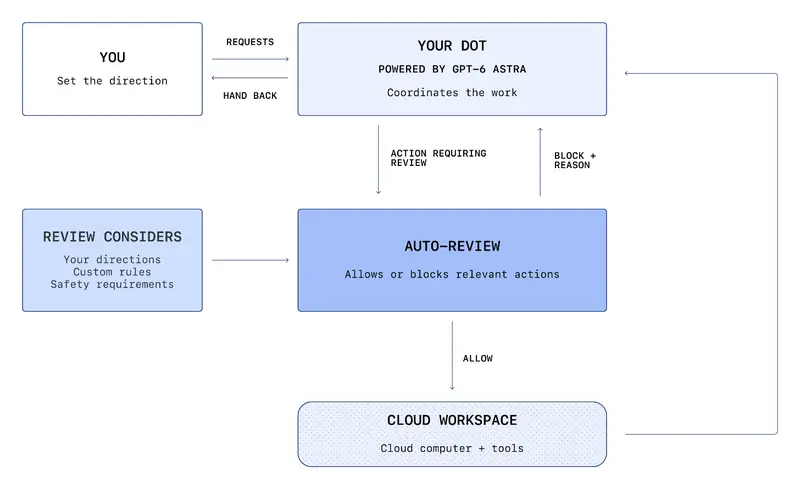
This diagram shows the path an action takes: when a dot wants to take an action that needs review, Auto-review checks it first, and it proceeds in the cloud workspace only if approved. If blocked, the review tells the dot why. The review considers your instructions, your rules, and OpenAI’s safety requirements.
OpenAI also warns that dots can still make mistakes, so you should check important results yourself. OpenAI says these protections can lower the risk of inappropriate actions caused by malicious instructions, but cannot eliminate that risk.
For better privacy, you can:
- Connect only a few apps at first: Background research reads sources you connect and allow. There is no separate switch to turn it off; you can only pause or delete the entire dot. Pausing stops its current main task, but does not stop every task that has already been delegated.
- Know what deletion removes: Deleting (resetting) a dot removes its own memories, conversations, and scheduled tasks, but does not remove files it created, Codex conversations, or ChatGPT conversations. Changes it has made and messages it has sent cannot be taken back. You currently cannot view or delete an individual dot memory.
- Disconnecting does not make it forget: Disconnecting an app does not delete information the dot has already retrieved from that app. To delete that information, you have to delete the whole dot.
- Memory is shared with ChatGPT: Dot memories can be shared with ChatGPT memory. Turning off ChatGPT memory stops sharing, but does not delete information the dot already has.
- Training settings depend on your plan: Business, Enterprise, and Edu data is not used to train models by default. For personal plans, check the Improve the model for everyone setting. OpenAI says it does not directly use background research and dot notes to train models, but content may still be used if it enters an eligible conversation or task. Even with model improvement turned off, human review may happen in limited cases, such as for safety.
Dots are not currently available to users under 18.
Who can use dots, and how much do they cost?
| Plan | Dots included? | Details |
|---|---|---|
| Free, Go, Plus | No | The comparison table on the chatgpt.com pricing page says No |
| Pro 100/200/500 | Yes (see regional availability below) | $100/200/500 per month; initial Pro rollout excludes the European Economic Area, Switzerland, and the United Kingdom; users must be 18 or older |
| Business Premium | Yes | $100 per user per month (annual billing) or $125 (monthly billing); all regions where ChatGPT is supported |
| Enterprise, Edu, Healthcare | Beta | Off by default and must be enabled by an administrator |
As of September 30, 2026, OpenAI was rolling dots out gradually, so it could take a few days to appear in your account. Taiwan: OpenAI has not listed availability country by country. The initial Pro rollout excludes the European Economic Area, Switzerland, and the United Kingdom; Taiwan is not on the exclusion list, but check your account to confirm whether you can use it.
The dollar prices in the table come from the Help Center. In Taiwan, the pricing page displays prices in NT$; check the checkout page for the actual amount.
Costs:
- Your first dot is included with a Pro or Business Premium plan, with no extra charge.
- Chatting with a dot does not count toward ChatGPT usage limits. However, tasks you ask it to do in Codex (OpenAI’s coding agent) or ChatGPT Work count as usual.
- According to the Help Center, for about one month starting September 29, 2026, dots usage does not count toward plan allowances. After that, usage will follow each plan’s terms. Do not assume there are no limits.
- OpenAI has only said that you will be able to add more dots and increase an individual dot’s speed or monthly workload in the future. There is no pricing yet.
A little like Meta Muse
When reporting on dots, TechCrunch and The Decoder compared them with Meta’s AI agent, Muse. For details about Muse, see What Is Meta Muse?; this article does not compare them feature by feature.
On the same day, OpenAI also introduced ChatGPT Space, a shared workspace where team members, ChatGPT, and your dot can work together. It includes a new type of document called Pages and is for eligible Pro, Business, and Enterprise plans.
Takeaway
Dots may suit people who already pay for Pro or Business Premium, spend much of their day in Slack, Teams, and connected apps, and want routine tasks to run in the background.
Plus users cannot use dots yet. If you are not ready to connect a work account to AI, there is no need to rush into it.
If you do try one, start by connecting only a few apps, set strict custom rules, require your approval for actions such as sending email, deleting, and making payments, and check Activity View regularly. Dots shift AI from “you ask, it answers” to “it acts first, then you approve.” How much time that saves depends on where you set that point of approval.
Further reading
Sources
Cover image source: OpenAI (openai.com/index/introducing-dots/)
- Introducing dots: https://openai.com/index/introducing-dots/
- How we build safety, security, and privacy into dots: https://openai.com/index/how-we-build-safety-security-and-privacy-into-dots/
- Help Center, Getting started with your dot: https://help.openai.com/en/articles/20001530-getting-started-with-your-dot
- Help Center, Dots privacy, security, and safety FAQs: https://help.openai.com/articles/20001529
- Help Center, ChatGPT release notes: https://help.openai.com/en/articles/6825453-chatgpt-release-notes
- About ChatGPT Pro tiers: https://help.openai.com/en/articles/9793128-about-chatgpt-pro-tiers
- ChatGPT Business overview: https://help.openai.com/en/articles/8792828-chatgpt-business-overview
- ChatGPT plans and pricing: https://chatgpt.com/pricing
- ChatGPT dots feature page: https://chatgpt.com/features/dots/
- DevDay 2026 Recap: https://openai.com/index/devday-2026-recap/
- Codex dots documentation: https://developers.openai.com/codex/dots
This article provides consumer information about AI product features and subscription plans, not securities or investment advice. Actual features and pricing are subject to the latest official OpenAI announcements. Information in this article is current through September 30, 2026, and may be out of date.