The Crypto.com Card is a Visa prepaid card issued by Singapore-based Foris Asia. Rewards are paid in CRO. Basic is free with no rewards; Plus and higher tiers require a Level Up subscription or CRO staking. See What to know before applying for fees and risks.
What Is Crypto.com? Company Background
Crypto.com was founded in 2016. Its stated vision is “Cryptocurrency in Every Wallet.” Co-founder and CEO is Kris Marszalek. In May 2024, the company announced that it had surpassed 100 million users worldwide. In July 2026, Citadel Securities invested US$400 million, the first institutional funding round in Crypto.com’s history.
Its products include the Crypto.com App, the Advanced exchange, the Onchain self-custody wallet, and the Level Up rewards program. This card is part of Level Up. The card for Taiwan users is issued by Singapore-based Foris Asia Pte. Ltd., which holds a major payment institution licence from the Monetary Authority of Singapore (MAS); the card network is Visa.
This is a prepaid card, not a credit or debit card. Funds are held in the issuer’s Crypto.com wallet. When you top up, cryptocurrency is first converted to local fiat currency. The Taiwan card balance is in Singapore dollars, so the fee table uses Singapore dollars (S$).
For a full comparison, see the Crypto.com Card review and comparison or compare it with other cards in the crypto card comparison.
Crypto.com Card Rewards and Tiers: Basic to Private
All rewards are paid in CRO. “First US$X” is the monthly spending limit eligible for rewards, not a cap on the reward amount. This limit applies whether or not you stake CRO. The table shows the non-Singapore-resident plan applicable to Taiwan.
| Item | Basic | Plus | Pro | Private (US$50,000 stake) | Private (US$500,000 stake) |
|---|---|---|---|---|---|
| How to qualify | Free; no lock-up | Subscribe to Level Up Plus for US$49.90 yearly or US$4.99 monthly, or stake US$500 of CRO for 12 months | Subscribe to Level Up Pro for US$299.90 yearly or US$29.99 monthly, or stake US$5,000 of CRO for 12 months | Stake US$50,000 of CRO for 12 months | Stake US$500,000 of CRO for 12 months |
| CRO rewards | 0% | 1.5% on the first US$750 spent each month; 0% above that | 2.5% on the first US$1,500 spent each month; 0% above that | 3.5% on the first US$3,000 spent each month; 0.5% above that | 4.5% on the first US$5,000 spent each month; 1.0% above that |
| Foreign transaction fee | 0.5% | 0% | 0% | 0% | 0% |
| Monthly free ATM allowance | S$200 | S$400 | S$800 | S$1,000 | S$1,000 |
| Physical card fee | S$4.99 | S$39.99 if monthly subscription has been active for less than 6 months; free with annual subscription, after 6 months of monthly subscription, or with a stake | — | — | — |
| Card balance limit | S$10,000 | S$15,000 | S$25,000 | S$25,000 | S$25,000 |
| Airport lounge access | — | — | 2 visits per year (annual subscription or stake) | Unlimited visits; no free guest | Unlimited visits; no free guest |
| Streaming rewards | — | 3 months of Spotify (annual subscription or stake) | Spotify and Netflix for 6 months after joining; up to US$13.99 per service per month, reimbursed in CRO (annual subscription or stake) | — | — |
Choose either a subscription or staking; you do not need both. Plus and Pro include a 30-day free trial before the first annual payment. Monthly subscribers do not get lounge access or streaming rewards; those benefits require an annual subscription or a stake. In Taiwan, CRO staking has a 365-day lock-up before the full amount can be unstaked, followed by an unbonding period of about 36 days with no rewards. Staked assets may be slashed if a validator makes an error.
Upgrading issues a new card. The old card is stopped immediately, the card number changes, and linked subscriptions must be updated.
These 16 merchant categories do not earn CRO rewards: money transfers, utilities, software, gift cards, financial institutions, quasi-cash, securities, insurance, rent, payment service providers, stored-value top-ups, professional services, fines, taxes, government services, and one other category.
Crypto.com Card Fees and ATM Withdrawals
- Annual and monthly card fees: None. A Level Up subscription is a separate charge.
- Virtual card: Free to issue.
- Physical card: S$4.99 for Basic; see the table above for Plus fees and waivers.
- Foreign transaction fee: For purchases in currencies such as TWD, Basic charges 0.5%; other tiers charge none.
- ATM: Withdrawals require the physical card and are available at ATMs outside Singapore. Withdrawals above the free allowance cost 2%; ATM operator surcharges count toward the allowance. Daily limits are S$500 for Basic, S$1,000 for Plus, and S$2,000 for Pro and Private, with up to 3 withdrawals per day.
- Top-ups: 0% by debit card, 1% by credit card, or 2% when topping up a card through Apple Pay. Minimum top-up is S$20.
- Inactivity fee: S$6 per month after 12 consecutive months without an active purchase. It stops when you use the card again.
- Replacement card: S$45.01 for Basic and S$50 for other tiers.
- Account closure: S$50 to refund a remaining balance; free if you spend the balance down to zero.
See Crypto.com Card fees in detail. For another crypto card application guide, see How to apply for RedotPay.
What to Know Before Applying
- The prepaid balance is held by the issuer. Its terms say that non-Singapore residents may not recover all their funds if the issuer fails.
- Rewards are paid in CRO, whose price fluctuates. Plus and higher tiers require a Level Up subscription or locked CRO; staking involves a 365-day hold plus about 36 days to unstake, and carries slashing risk.
- In January 2022, 483 accounts experienced unauthorized withdrawals. The company said no customer funds were lost; the remaining cases were fully reimbursed.
How to Apply for the Crypto.com Card (Where to Enter the Referral Code)
- Open the referral link in this guide (button above) to go to the Crypto.com sign-up page.
- Enter referral code
rekud9s7bxduring sign-up in the field labeled “Have a Referral Code?” The code is filled in automatically when you use the referral link. There is no field for it on the card application page. - Complete KYC. Taiwan users can use a passport, national ID, or driver’s licence; Little Penguin has confirmed that common identity documents work.
- Open Level Up from the top-right of the App home screen and choose a plan: Basic needs neither a subscription nor a stake; other tiers require one or the other.
- Tap Start next to Crypto.com Card. Pro and Private (US$50,000 stake) let you choose a card colour. Enter your home address and the name to print on the card.
- The virtual card is issued immediately and can be used online. For a physical card, go to Card → More → Settings → Request Physical Card.
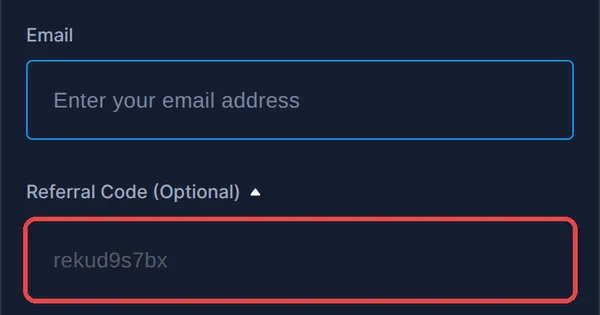
If you missed the referral code during sign-up, you can add it from the referral page using “Add a referral code,” within 14 days of KYC approval and before your first transaction.
Signing up with a referral code means you cannot also claim the new-user welcome bonus; choose one or the other.
Using the Card in Taiwan
Crypto.com’s application guide lists the Asia-Pacific region, which includes Taiwan, as eligible for card issuance. Physical cards take about 9 to 18 business days to arrive. Taiwan users have the non-Singapore-resident plan shown above.
- Apple Pay: The official list includes users with a Singapore-issued card and a non-Singapore residential address.
- Google Pay: Also supported; it can be added as soon as the virtual card is issued.
- JKoPay: Not supported. JKoPay only allows credit cards issued by its domestic partner banks.
- TWD purchases: Basic charges a 0.5% foreign transaction fee; Plus and higher tiers do not.