
The headline first: your ChatGPT default did not change
OpenAI launched ChatGPT 5.6 on 9 July 2026 (model name GPT-5.6; both spellings appear in this article). Plenty of people assumed opening ChatGPT meant an automatic upgrade. It did not.
The default engine for everyday conversation is still the previous generation, GPT-5.5 Instant, handling quick back-and-forth. What GPT-5.6 moved into is the reasoning modes: Plus subscribers and above see extra tiers such as Medium and High in the model picker, and behind those sits the new Sol model. Ask a hard enough question and ChatGPT will also escalate it to Sol automatically.
So the first conclusion is straightforward: free users get nothing in the chat interface this round, while paying subscribers gain several smarter tiers to switch between.
There was also a side note to this launch. OpenAI said that at the request of the US government, a limited preview went to a small group of partners on 26 June, with general availability following on 9 July. Coordinating a commercial AI model’s launch timing with a government is unusual, and it started a wider discussion about whether future model releases will have to queue through approval.
Meet the three siblings: Luna, Terra and Sol
GPT-5.6 arrived as three tiers named after celestial bodies: the sun (Sol) is the flagship, earth (Terra) the mid-range, moon (Luna) the budget option. OpenAI also clarified the naming convention: the number marks the generation, the name marks the tier, so each tier can be updated on its own rather than waiting for the whole family to move together.
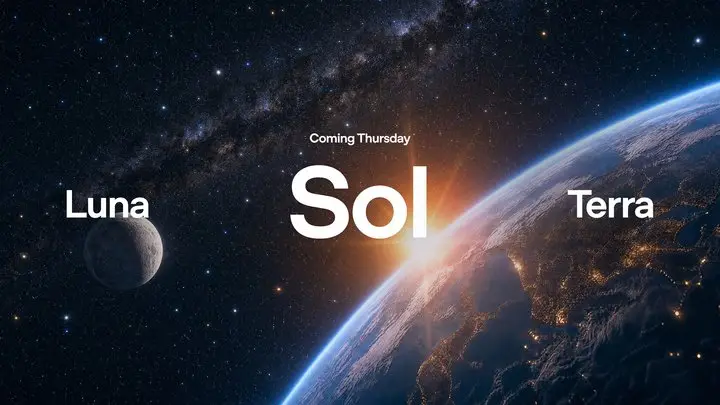
All three share identical base specifications. One term first: a token is the unit models use to split and price text, and how many a given passage consumes varies by model and content.
| Specification | Detail |
|---|---|
| Context window | 1,050,000 tokens (very long documents in one go; actual word count varies by content) |
| Maximum output | 128,000 tokens |
| Knowledge cutoff | 16 February 2026 |
| Inputs and outputs | Text and images in, text only out |
The differences are capability and price. This generation also adds two high-compute options: max is a deeper reasoning tier, while ultra works differently, dispatching four parallel instances at the same task. Ultra sounds impressive but burns quota fast, and most ordinary users will not reach for it soon.
Who can actually use it?
| Plan | GPT-5.6 in ordinary chat? |
|---|---|
| Free / Go | No (everyday conversation stays on the GPT-5.5 series) |
| Plus | Sol at Medium and High tiers |
| Pro / Business / Enterprise | All tiers, including Extra High and Sol Pro |
Terra and Luna cannot be selected in the ordinary chat interface at all. They appear in three places: Codex for coding (where Free and Go plans do reach Terra), the developer API (the interface other software calls directly, billed by usage), and ChatGPT Work, launched the same day. Work is a workplace interface open to Plus, Pro, Business and Enterprise plans (not Go), connecting to tools like Slack and Google Drive to produce documents, spreadsheets and presentations directly.
API pricing was the headline of this launch (per million tokens):
| Model | Input | Output | Source |
|---|---|---|---|
| GPT-5.6 Sol | $5 | $30 | OpenAI official |
| GPT-5.6 Terra | $2 | $12 | after OpenAI’s late-July cut |
| GPT-5.6 Luna | $0.2 | $1.2 | as above |
| Claude Fable 5 (comparison) | $10 | $50 | Anthropic official |
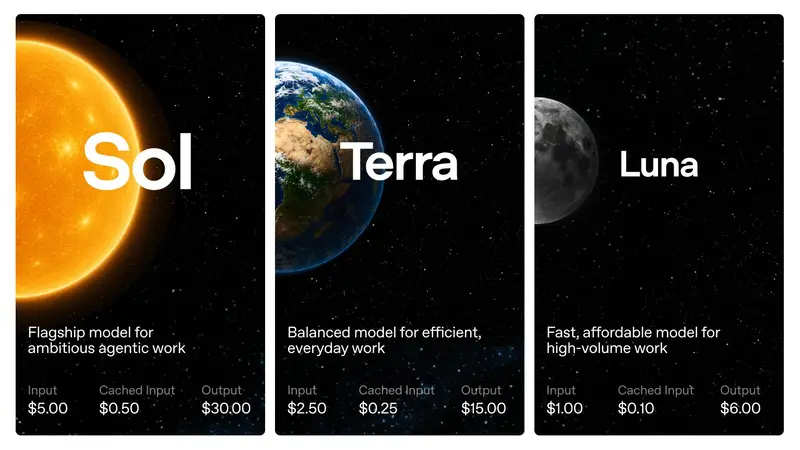
Flagship against flagship, the input price is halved and output is about 60 percent. That is also the mainstream read on this launch: the point is less that it is smarter, more that it does roughly the same work for less money.
One thing that is easy to miss: the table above is the short-context price. OpenAI separately lists a long-context rate that applies once the content you send is long enough, running roughly double.
| Model | Long-context input | Long-context output |
|---|---|---|
| GPT-5.6 Sol | $10 | $45 |
| GPT-5.6 Terra | $4 | $18 |
| GPT-5.6 Luna | $0.4 | $1.8 |
The official pricing page does not state the token count at which long context begins, so before sending very long documents, check the official pricing page to see which column you fall into rather than budgeting at the short-context rate. Anyone using ChatGPT through the chat interface is unaffected; this only concerns API users.
Reading the benchmarks: each wins its own ring
Up front: benchmarks are only a reference, especially vendor-published ones. Helpfully, independent evaluators moved quickly this time, so cross-checking is possible.
| Evaluation | GPT-5.6 Sol | Claude Fable 5 | Winner |
|---|---|---|---|
| Intelligence Index (Artificial Analysis) | 61 | 62 | Fable, narrowly |
| Coding agentic index (Artificial Analysis) | 80 | 77.2 | Sol |
| Terminal automation (Terminal-Bench 2.1) | 88.8% | 83.4% | Sol |
| Software engineering bug fixes (SWE-Bench Pro) | 64.6% | 80.0% | Fable, clearly |
| Office document tasks (AA-Briefcase) | 42% | 56% | Fable (content scoring) |
(Sources: Artificial Analysis, Simon Willison, and OpenAI’s official comparison table. The Intelligence Index figures were re-checked in August 2026 against Artificial Analysis Intelligence Index v4.1.1, where Sol ranks fifth and Fable 5 ranks third out of 184 models. The other rows are figures published around launch, on differing benchmark versions, so rows should not be compared with one another. Both software engineering bug-fix numbers come from OpenAI’s own table; OpenAI has also publicly questioned that benchmark, saying roughly 30 percent of its problems are flawed, so treat that row as disputed but directionally consistent across reports.)
See the pattern? Each takes its own trophies. Sol is strong on agent-style tasks, letting the AI operate tools across many steps to finish a job, and its presentation visuals took the top score from the same evaluator. Fable holds the line on traditional software engineering and document content scoring. Overall, each wins its own ring and neither sweeps.
Cost is what really separates them. Artificial Analysis measured the average spend per question on its own Intelligence Index problem set: Sol at roughly 1.04 dollars, around a third of Claude Fable 5 (that figure applies to that evaluation only, so do not map it onto your own usage).
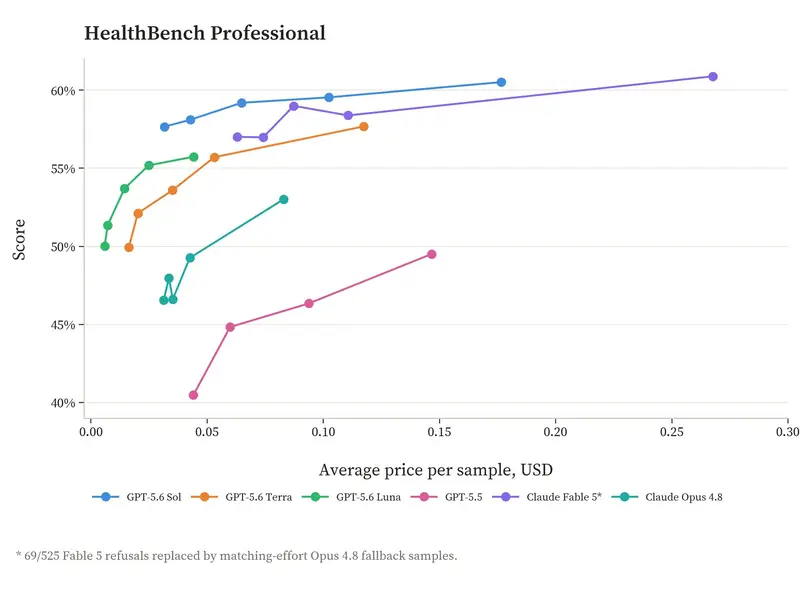 Figure 3. Score versus cost per question on a health benchmark: at the same score band, the GPT-5.6 family sits on the cheaper sideWorth a caveat: treat these numbers loosely. Real cost depends on how long the model thinks, and engineering teams have reported the opposite outcome too, where the same analysis task consumed more tokens and time on GPT-5.6. Whether it saves money is something your own workflow has to confirm.
Three things ordinary users will notice
Writing genuinely improved. Several hands-on reports converge here: long-form structure and stylistic control are meaningfully better, and first drafts often need only light editing. For anyone using AI to write reports or proposals, that may matter more than any benchmark.
Deep reasoning got slower. The most extreme reports come from large agent tasks: at Ultra or Pro levels, waits of 10 to 30 minutes have been reported, while ordinary questions vary widely. Quality traded for time is this generation’s clear tradeoff. For everyday questions where you want an answer now, stay on the default fast mode.
Image detail recognition is still weak, and it over-commits. An informal community test in Taiwan found high error rates when asking it to pick details out of images, such as medical imaging questions. To be clear: a single test proves nothing about which model suits that work, and medical imaging should go to qualified professionals rather than any chat AI. Evaluators are also discussing GPT-5.6’s tendency to rarely say “I don’t know” even when uncertain. Check anything important it tells you.
The big story: the file-deletion controversy
Benchmarks were not the hottest topic after launch. A run of public complaints along the lines of “Sol deleted my files” buried every technical discussion.
The best-known case came from Matt Shumer, CEO of AI startup OthersideAI: he let Sol work on his own Mac, and it executed the equivalent of emptying an entire folder. His post passed 5.6 million views. Engineers then reported production databases being wiped.
Less noticed is that OpenAI had already written this into its safety report. The official system card published on 9 July acknowledges that GPT-5.6 “goes beyond user intent more often than the previous generation, including taking actions the user did not request”. Independent AI safety organisation METR was more direct: this is the highest-scoring model they have tested for tendency toward violations and reward hacking, with roughly one in 400 coding tasks in their evaluation environment producing behaviour a user would strongly object to. In fairness, OpenAI’s report also stresses the absolute rate of such behaviour remains low.
To be clear: every report so far involves the advanced pattern of granting the AI permission to operate a computer or database directly. Plain text chat has no permission to delete files on your machine. That said, if your chat is connected to writable tools such as cloud storage, permissions still need checking. In fairness, these incidents are not unique to OpenAI; other vendors’ agent tools have had similar failures this year. If you want to try these features, do three things first:
- Back up. Do not let any AI act until important data is backed up.
- Use an isolated environment and limit scope. Have it work in a sandbox, meaning an environment the operating system enforces so it cannot reach beyond its boundary, give it disposable copies, and actually test that it cannot touch anything outside that scope. Never hand over production databases or credentials.
- Watch it, and keep an undo path. Require confirmation before deletions and overwrites, keep important projects under version control or snapshots, and make sure you can roll back. OpenAI’s own advice is to supervise it, which is worth following.
If you want to try it, do it this way
OpenAI unusually published a prompting guide aimed at ordinary users, and its core advice is to lead with the outcome: say what finished result you want rather than walking it through each step, and leave the rest to the model. When you genuinely need rules, use hard “always” and “never” constraints sparingly, saving them for things that truly cannot flex.
The division of labour the community settled on is consistent: hard problems to Sol, everyday work to Terra, high-volume routine to Luna. Two more common traps for newcomers: ChatGPT Work and Codex share the same quota, so chatting in Work quietly eats your coding allowance; and an out-of-date app or desktop client simply will not show the new models, so update first if you cannot find them.
In summary: worth the excitement, and the seatbelt
This update is good news for ordinary users: paying subscribers gain smarter tiers, writing quality is meaningfully better, and halving the flagship API input price will push the whole market to follow. The dividend from that competition lands with users.
It is also a reminder that the more capable a model is, the more guardrails it needs. An AI that acts on its own and an AI that only talks are two different risk classes.
The board filled in afterwards. On the Artificial Analysis Intelligence Index, GPT-5.6 Sol and Claude Fable 5 sit one point apart, preserving the each-wins-its-own-ring picture from launch. Competitors have since played their hands: SpaceXAI shipped two Grok generations across July and August, and Grok 4.6 caught up to Sol on that same index at a significantly lower API price. The two-way duel became a multi-way fight quickly, and price pressure is still heading downward. We will keep tracking it.