The Short Answer
Claude Code dynamic workflows are delegation scripts Claude writes for large tasks. In the background, a script directs many subagents (helpers the main Claude sends out to handle individual pieces of work). It can have independent agents check one another’s work, then combine their findings. Anthropic says a single run can send dozens to hundreds of subagents.
This article calls a dynamic workflow a workflow for short.
What Tasks Are a Good Fit?
Examples in Anthropic’s documentation:
- Scanning an entire codebase for bugs
- Migrating 500 files
- Research that requires comparing multiple sources
The strength is cross-checking: independent agents can try to disprove one another’s findings before the results are combined.
How to Start
- Ask for one directly: Describe what you need in your own words, such as “use a workflow to …”, or include
ultracodein your prompt. Merely mentioning the word workflow does not count. - Let Claude decide: Turn on ultracode, and Claude will decide whether a larger task should use a workflow. See the ultracode guide.
- Pro plan: Workflows are off by default. Turn on “Dynamic workflows” in
/config. They are on by default for Max, Team, and Enterprise.
In normal mode, Claude asks before starting. You can run it, inspect the script first, or decline.
What a Run Looks Like
A workflow runs in the background, so you can keep chatting with Claude about something else. Enter /workflows to see progress: the number of agents in each stage, tokens used, and elapsed time. You can also pause or stop a run. When it finishes, the report appears in your conversation.
The image below shows a workflow progress screen from an Anthropic example: a React project migration to Solid.js, split into 6 stages. At the midpoint, 28 of 35 agents had finished.
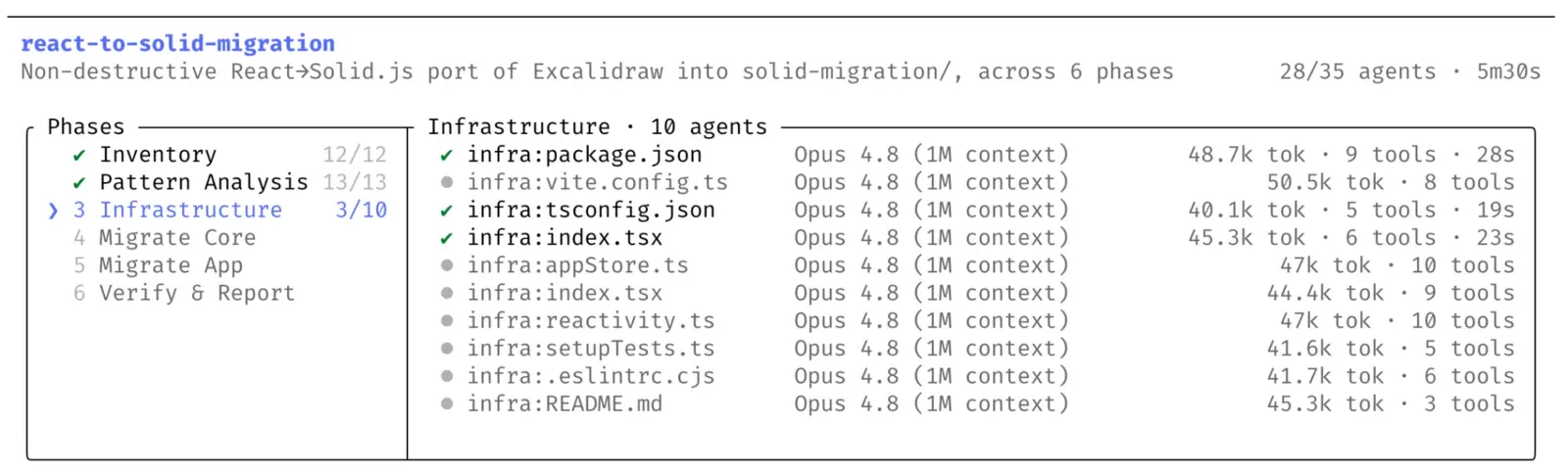
Image credit: Anthropic (Introducing dynamic workflows in Claude Code)
If a run is interrupted, you can resume it in the same session (the same conversation).
How Much Does It Cost?
There is no fixed price. A workflow may use noticeably more tokens than an ordinary conversation, and that usage counts toward your plan’s usage and rate limits. For your first try, use a small part of a task, such as one folder or a narrowly scoped question. Scale up once you get a feel for it.
How Penchan’s AI Team Uses It
These are records of workflows run by Penchan’s AI team:
- Fact-checking this article: Two agents independently read Anthropic’s documentation and update history. A third compared their findings against the original webpages line by line, and a fourth filled in gaps. In total: 4 agents, about 540,000 subagent tokens, and about 12 minutes. The check also found that ultracode had changed in late September, and the old article has since been updated.
- A larger run: An overnight market research project used 42 agents. The largest run used 168 agents for about 11.6 hours, checking website data pages one by one.
- A lesson learned: A writing agent reported that it had not included any links that required payment, but its draft contained a URL that did not exist. Check the deliverable itself instead of relying only on an agent’s report.
When Not to Use It
- Small tasks or a single file: They use more tokens without giving you much in return.
- Tasks that need answers from you along the way: A workflow cannot accept your input while it is running.
- When you are near your usage limit: Narrow the scope or skip it for now.
To turn workflows off, disable “Dynamic workflows” in /config. To stop a workflow that is already running, use /workflows.
Penchan’s Take
If you have a large task that can be split up, such as an audit, migration, or research that needs cross-checking, and your plan has enough usage left, a workflow is worth trying. For a few lines of code or one or two files, you can skip it.
Running many agents gives you speed. Independent agents challenging one another is what makes the result dependable. The value of a workflow is cross-checking, not the number of agents.
Further Reading
- ultracode: Let Claude decide whether to start a workflow
- How to choose Claude Code effort
- Design principles for multi-agent systems
- Claude Opus 4.8 introduction
- Claude Code beginner’s guide
References
Cover image credit: Anthropic (claude.com/blog/introducing-dynamic-workflows-in-claude-code)
- Claude Code Docs, Dynamic workflows: https://code.claude.com/docs/en/workflows
- Claude Code Docs, Agents: https://code.claude.com/docs/en/agents
- Anthropic, Introducing dynamic workflows in Claude Code, 2026-05-28: https://claude.com/blog/introducing-dynamic-workflows-in-claude-code
- Claude Code CHANGELOG: https://raw.githubusercontent.com/anthropics/claude-code/main/CHANGELOG.md
This article provides consumer information about AI product features and subscription plans and does not concern securities or provide investment advice. Actual features and usage limits are subject to Anthropic’s latest official announcements. The information in this article is current as of October 3, 2026, and may be out of date.