The full Fable 5.1 overview covers specs, pricing, and safety improvements. This article covers something else: how to prompt it so it performs at its best.
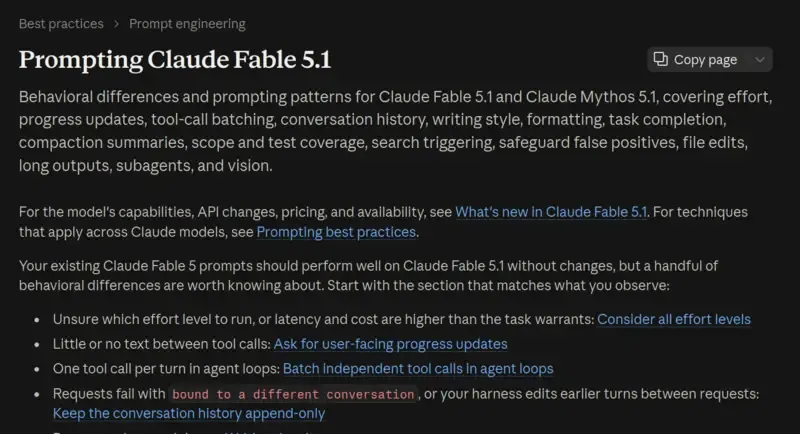
Anthropic’s official documentation lists 16 behavioral differences between Fable 5.1 and Fable 5, each with a matching prompting technique. The original is an English technical document; this article organizes it by user type into three sections: casual chat, Claude Code users, and API developers. Just read the section that applies to you.
Techniques Everyone Can Use
Effort Levels: The Most Important Dial
Fable 5.1 has five effort levels: low, medium, high (default), xhigh, and max. The higher the level, the more time the AI spends thinking, and the better the answer quality—but also the higher the cost and the slower the response.
The key point: Fable 5.1’s effort levels don’t map directly to Fable 5’s. The same name represents a different amount of thinking on different models, so when you switch models, retest which level actually fits your use case.
A few practical takeaways:
mediumquality is roughly on par with Fable 5’shigh, but cheaper. Daily conversation and simple Q&A are fine atmediumlowperforms close to Opus- and Sonnet-tier models, but scores higher. If you were considering a smaller model to save money, Fable 5.1’slowis a better option- Save
xhighandmaxfor tasks that genuinely need deep reasoning
The Writing Style Has Changed
Fable 5.1’s writing is denser than Fable 5’s—longer sentences, tighter paragraphs, more refined word choice. It’s an improvement overall, but if you need light, easy-to-read text, you’ll need to actively steer it.
The simplest fix: add a line to your CLAUDE.md or project settings:
Don't use flowery or rhetorical language. Prefer plain, direct phrasing over metaphor whenever possible.For finer control, describe what “mannered prose” means to you: define things like using metaphor in place of direct statements, or letting rhetorical flourish obscure meaning, so the AI knows exactly what to avoid. Write this kind of rule into CLAUDE.md once—no need to repeat it every conversation.
There’s a change in the opposite direction too: Fable 5.1 uses less formatting than its predecessor. Claude used to get criticized for reflexively adding bold text, bullet points, and headers, so a lot of people added “use less formatting” instructions to their settings. Fable 5.1 has already self-corrected, and now might under-format instead. If your CLAUDE.md or custom instructions have anti-formatting rules, consider removing them, or rewriting them as positive guidance:
Use bullet points when they help, and bold text when something needs emphasis. If the person asks for a plain format, use plain text.Task Behavior: It Might Do Too Much, or Stop Too Early
Fable 5.1’s task behavior has two opposite tendencies, and you need to address them separately.
Doing too much: ask it to change one line of code, and it might refactor a nearby function and write three extra test files along the way. Anthropic recommends adding scope constraints in CLAUDE.md—the core idea is to tell it “if you find issues outside the task scope, don’t fix them, just report them in the summary,” and “only write tests when the task or project convention calls for it.”
Stopping too early: it might ask “should I continue?” halfway through, or describe the next step without actually doing it. Anthropic’s prompt guidance for this is longer, but the core idea boils down to two lines:
- Tell it “the user isn’t watching in real time and won’t answer mid-task questions”
- Tell it “before finishing, check your last paragraph. If it’s a plan, an analysis, a list of next steps, or a promise you haven’t acted on yet, go do it now”
Write both of these into CLAUDE.md and you don’t need to repeat them every conversation. Doing too much and stopping too early can both show up at different times—the two instructions don’t conflict, so you can include both.
Prompting Techniques for Claude Code Users
Less Progress Reporting
If you use Claude Code, you’ll notice that Fable 5.1 stays nearly silent between tool calls. Fable 5 would narrate as it worked—“I found X, next I’ll do Y”—while Fable 5.1 is a lot quieter. This gets more noticeable the higher the effort level and the longer the tool chain.
First check one thing: Fable 5.1 sends progress reporting through progress updates inside the thinking block. Your client needs to set thinking.display to "updates" to receive them. Many clients use the default "omitted", in which case you won’t see them at all.
If it’s already on and still not enough, add this to your system prompt:
Before you start, say a sentence about what you're going to do. Give brief progress
updates while working. End with a complete summary so that someone who only reads
the last message can still get the full picture.
Also, if your client collapses tool output (so the user can’t see it), tell the AI that explicitly. Otherwise it may assume the user can see the command output and stop repeating the key points.
Security False Positives
Fable 5.1’s security false positives are already much better than Fable 5’s (about 60% fewer in Claude Code), but you’ll still run into them. Three situations that tend to trigger them, and how to handle each:
| Situation | Fix |
|---|---|
| Asking “will this program compile” | Rephrase as “does this program have bugs” |
| Code in an obscure programming language | Attach that language’s documentation in context |
| Tool output containing base64-encoded data | Remove the base64 data |
When blocked, the API returns stop_reason: "refusal". For sensitive security questions, Fable 5.1 automatically hands off to Opus 4.8 to answer, at no extra charge.
Small Edits Rewriting the Whole File
Fable 5.1 rewrites entire files more often than Fable 5 does, even when only two lines need to change. The result is usually the same, but it wastes output tokens and time. One line of prompting fixes it:
As long as the result is unaffected, prefer making localized edits to the file rather than rewriting the whole thing.Technical Notes for API Developers
The following is more technical, aimed at developers working directly with the Messages API or building agent systems.
Keep Conversation History Append-Only
Fable 5.1’s most important technical change. Each turn’s thinking block is now bound to the conversation prefix that produced it (system prompt + tool definitions + all prior messages). If you modify a previous turn between two API calls, the next call returns a 400 error.
Things you can no longer do in practice:
- Inject or delete prompts between turns
- Summarize or delete old turns in place
- Change the system prompt or tool definitions mid-conversation
Alternatives:
- Use a turn-scoped system message for per-turn instructions (
clear_at: "next_user_message", requires the beta headermid-conversation-system-clear-at-2026-08-21) - Append instruction or tool changes with a mid-conversation system message rather than overwriting
- Use server-side compaction or context editing to compress the conversation
- If you compact on the client side yourself, the safest approach is to replace the entire history with one summary plus a new user turn, carrying no old thinking blocks
Accounts created after August 31, 2026 already have this restriction enforced. Existing accounts will get it eventually too. Anthropic recommends making the change now.
Batch Tool Calls Together
In coding agent and computer use scenarios, Fable 5.1 tends to issue only one tool call at a time, even when multiple independent tools could be called together. This doesn’t hurt quality, but it wastes tokens and time.
Attach a turn-scoped system message after every tool result you return:
First list out what you need next, then issue all independent requests together in this same response.The official documentation includes complete code examples in seven languages—Python, TypeScript, Go, C#, Java, PHP, and Ruby—showing exactly how to place the turn-scoped system message.
What to Preserve When Compacting
When a conversation gets too long and needs compacting, Fable 5.1 responds well to explicit preservation instructions. Anthropic’s recommended summarization prompt lists six categories of information that must be preserved:
- Problems encountered and their solutions
- Approaches that were considered and ruled out
- Decisions, preferences, and constraints made (keep original wording)
- Current progress
- Unfinished items and next steps
- Hard-to-reconstruct details: names, numbers, dates, links
A special rule: preserve the user’s own words as close to verbatim as possible; the AI’s own analysis can be condensed heavily.
Other API Adjustments
A few smaller but notable behavioral differences:
Lower search rate at low effort. At low effort, Fable 5.1 answers from memory more often instead of calling the search tool. You can add to the system prompt: “Recognizing a name doesn’t mean knowing its current state. Especially in fast-moving areas like AI models and dev tools, search even if you already have an impression.” You can also raise the effort level just for turns that need a search (the API supports switching effort mid-conversation).
Copying sources verbatim. When summarizing documents, Fable 5.1 more often copies the original text directly instead of citing it. The most effective fix is putting a complete example of a correct answer in the system prompt, showing the AI what it looks like to “paraphrase in your own words, quote only a short line, and cite the source.”
Token waste on long outputs. At xhigh and max effort, the AI may draft the full response once inside thinking, then rewrite it again in the output, doubling token consumption. Add an instruction at the end of the user message telling it that thinking and output share the same token budget, so it shouldn’t write out the entire deliverable twice.
Parallel sub-agents. If your architecture supports sub-agents, have the tool that launches a sub-agent return immediately so the main agent can keep doing other work. Also provide a separate “wait for result” tool so the main agent can decide when to wait.
Give it a crop tool for image analysis. Fable 5.1’s vision capabilities have improved, but the best way to handle dense charts is to let it crop and zoom into specific regions on its own. A simple image crop tool substantially improves image analysis accuracy.
Takeaway
Fable 5.1’s prompting techniques boil down to two things:
- Use effort levels well.
mediumis enough for daily use—saves money without losing quality. Only reach forxhighormaxwhen you genuinely need deep reasoning - Scope permissions. Fable 5.1 is capable, which also makes it prone to doing more than asked. Tell it explicitly in CLAUDE.md what not to touch—write it once and it applies going forward
The complete official guide (with code examples in seven languages) is in the Anthropic documentation; for implementation details, go read the original.
Related reading: the full Claude Fable 5.1 overview for specs, pricing, and safety improvements, and the Claude Fable 5 overview for background on the previous model.