
A lot of people get Gemini app and Google AI Studio confused. They do different things. Gemini app is for using AI. AI Studio is for building and testing AI. The clearest dividing line: only AI Studio can generate an API key.
What Is Google AI Studio
Google AI Studio (aistudio.google.com) is Google’s browser-based platform for testing and developing with Gemini models. You can write prompts and see responses directly, set System instructions, tune temperature / top-P / top-K, test structured output (JSON), Function calling, Code execution, and Grounding with Google Search — all without writing a line of code.
Once you’ve dialed something in, hit “Get code” and the entire prompt setup exports as Python, Node.js, or REST. That’s the killer workflow — it collapses the gap between playground experiments and production code.
Core differences between AI Studio and the Gemini app:
| Dimension | Gemini app | Google AI Studio |
|---|---|---|
| Purpose | End-user interface for using AI | Developer platform for testing and building AI |
| API key | Cannot generate | Can generate — the only place to do it |
| Parameter control | Not supported | temperature / top-P / top-K all adjustable |
| System instructions | Limited | Full support |
| Code export | None | Python / Node.js / REST one-click export |
| Multimodal input | Supported | Supported (text / image / audio / video) |
| Cost | Free (with plan differences) | Interface free; API has free and paid tiers |
| Who it’s for | General users | Developers, technical content creators |
The interface is in English. Sign in directly at aistudio.google.com — no extra configuration needed.
Getting Started
Sign In
Go to aistudio.google.com and sign in with any Google account. You need to be 18 or older. No credit card, no waitlist.
Run Your First Prompt
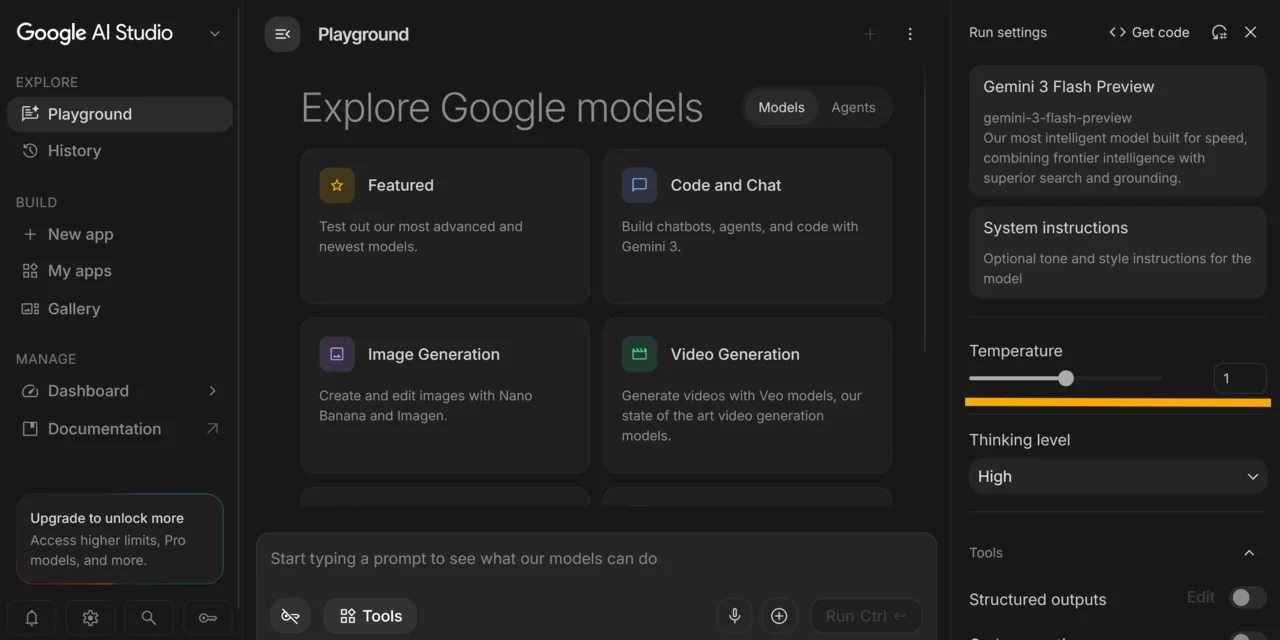
After signing in you land in the Prompt playground. The layout is three columns: a left navigation panel, a center chat area, and a right settings panel.
Ignore the right panel for now. Type anything in the center input box and click “Run” to see the model respond.
Want the model to play a specific role or follow consistent rules? Fill in the “System instructions” field. For example:
You are a technical documentation writer. Explain complex concepts with concrete examples.
Keep all responses concise and practical.
System instructions are injected before every conversation turn — you don’t need to repeat yourself each time.
Tune the Parameters
Three controls on the right panel that get used most:
- Temperature: controls how creative/random the output is. 0 = most deterministic and consistent; higher values = more variety. Turn it down for code generation or format-sensitive tasks; turn it up for creative writing or brainstorming.
- Top-P: controls the cumulative probability range of candidate tokens — works together with Temperature to shape output diversity. Default is fine for most use cases.
- Top-K: caps the sampling pool at the top K most likely tokens at each step.
- Model: switch from the dropdown. Current options include Gemini 2.5 Pro (1M context), Gemini 2.5 Flash, and others — this changes fast, so check the official docs.
Key Features
Structured output (JSON): Forces the model to return JSON that matches your specified schema — no extra explanatory text. Useful when you’re building data pipelines and need clean, parseable output.
Function calling: The model decides which function to call and with what arguments; your application handles the actual execution. Standard pattern for AI agents and anything that needs external tool access.
Code execution: The model can run Python code in a sandboxed environment and bring the result back into the conversation. Useful for math, data processing, and any task where running code is faster than describing the answer.
Grounding with Google Search: The model searches Google before responding, reducing stale answers on topics past its knowledge cutoff.
Multimodal input: Upload images, audio, or video alongside your text prompt — not just plain text.
Generative media: Access to Veo (video generation), Imagen (image generation), Nano Banana, and other generative models, depending on your account permissions.
Get code: Export the full prompt setup as Python, Node.js, or REST in one click. The most friction-free path from testing to production.
New after Google I/O 2026: Native Android app generation, one-click Cloud Run deployment (via Firebase), and Workspace integration. The natural-language app building was already there; I/O 2026 mainly added the deployment and integration layer on top, making it faster for non-engineers to ship something deployable.
Free vs. Paid
| Tier | Cost | Limits | Data usage |
|---|---|---|---|
| Interface / Playground | Always free | None | N/A |
| API free tier | Free, no credit card | RPM / RPD rate limits (tightened December 2025; 429s more common) | May be used for model training and human review |
| API paid tier | Pay-as-you-go, billed per token | No quota cap | Not used for training |
A few things worth knowing before you commit to a tier:
Free tier is fine for testing, not for volume: If you’re just poking at prompts and validating behavior, the free tier covers everything. The moment you start batch processing or building a service with real traffic, you’ll hit 429s fast. When that happens, add retry logic on your end or switch to paid.
Data privacy on the free tier: Prompts and responses on the free tier can be used by Google for model training and human review. That means personal data, customer information, credentials, business secrets — none of that belongs in free-tier prompts. The paid tier explicitly opts out of training data usage, which matters a lot for commercial use cases.
Current pricing lives at ai.google.dev/pricing — numbers shift with model updates.
Who Should Use AI Studio vs. the Gemini App
Simple decision:
Gemini app is enough if your needs are: asking questions, chatting, writing emails, organizing information, integrating with Google Docs or Gmail. No code required — just open the app.
You need AI Studio if you:
- Want a Gemini API key to connect to your own application
- Are testing different System instructions and parameter combinations
- Need Structured output / Function calling / Code execution
- Want to export prompts as runnable code
- Are a technical content creator demonstrating API workflows
The fundamental split: AI Studio is a development tool, Gemini app is a user interface. If you’re not writing code, the Gemini app is all you need.
How to Get a Gemini API Key
This is why most people come to AI Studio. The steps are short:
- Sign in at aistudio.google.com
- Find “Get API key” in the left sidebar and click it
- Click “Create API key” — the system creates a Google Cloud project automatically (or lets you pick an existing one)
- The full key string is shown exactly once. Copy it immediately and store it in a password manager or somewhere secure
- After closing the page, you’ll only see a truncated prefix — if you lose it, delete the key and create a new one
Once you have the key, the fastest way to connect (Python):
pip install google-genaifrom google import genai
client = genai.Client(api_key="你的 API KEY")
response = client.models.generate_content(
model="gemini-2.5-flash",
contents="用繁體中文解釋什麼是 Function calling"
)
print(response.text)Full SDK docs at ai.google.dev/gemini-api/docs.
Conclusion
The thing AI Studio does best is collapsing the distance from testing to production. Dial in your prompt in the playground, confirm the output format, click “Get code” — and you have code that’s ready to paste into your project. Compared to manually hunting through API docs and stitching together calls, it saves real time.
Two things worth watching. The free tier took a significant quota cut in December 2025 — 429 errors are noticeably more frequent. If you’re building a real service, plan for the paid tier early; getting rate-limited mid-session is annoying. The other thing: the free-tier training data policy is real. Don’t treat “free” as “safe to dump anything into” — if you’re handling data that has any privacy or commercial sensitivity, pay for the tier that opts out.
The English-only interface is a real barrier for some users, but the model itself handles non-English input and output without issues. You can write prompts and get responses in any language — you just need to navigate English button labels and settings.
Overall, for developers and technical content creators, AI Studio is the lowest-friction entry point into the Gemini ecosystem. Free, no waitlist, broadly available. Worth spending an hour in the playground before deciding whether you need to pay.
Further Reading
— Penchan